
WhatsApp Business Calling API: How Voice Calls with Customers Work
The WhatsApp Business Calling API adds voice calls to the WhatsApp Business Platform. Customers can call your business from WhatsApp, and you answer in your own software. You can also call customers, but only after they permit you. Calls from customers are free for you. Calls you make cost money per minute.
GREEN-API is a calling provider too. With GREEN-API, you can make and answer WhatsApp calls without WABA (WhatsApp Business Account). You get unlimited calls for $36 a month, with no charge per minute. See calls without WABA.
What is the WhatsApp Business Calling API?
The WhatsApp Business Calling API is part of the WhatsApp Business Platform. It works on top of the Cloud API, Meta’s API for sending and receiving WhatsApp messages. Your business number must already run on Cloud API. The voice goes over the internet, not over the phone network (Meta docs).
Meta uses two terms for the two directions of a call:
- User-initiated call. A customer calls your business.
- Business-initiated call. Your business calls a customer. The customer must give permission first.
WhatsApp introduced calling for businesses in its Calling API announcement.
A customer can call you in several ways:
- a call button in a message or in a welcome message;
- a link on your website;
- the call icon at the top of the chat.
This list comes from the Meta calling FAQ.
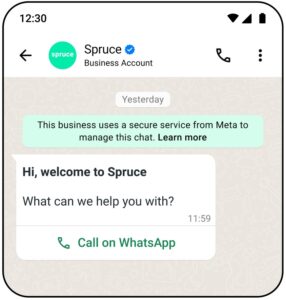
Two ways to start a call: the call icon in the chat header and a call button in a message. Image: Meta, from the WhatsApp Business Platform documentation.
The two directions have different rules and prices. See call permissions and limits and cost below.
How does WhatsApp Business Calling work: Graph API, SIP and WebRTC
Every call has two parts:
- Signaling starts, accepts and ends the call. You control it in one of two ways:
- Graph API, Meta’s HTTP API, and webhooks. A webhook is a message that Meta sends to your server when something happens.
- SIP (Session Initiation Protocol). It is a standard protocol that phone systems use to set up calls.
- Media is the voice. It always goes over WebRTC (Web Real-Time Communication). This technology sends voice over the internet in real time.
By default, Meta sends signaling over HTTPS and media over WebRTC (ICE, DTLS and SRTP). The audio codec is Opus (Meta docs).
You cannot connect a WhatsApp call to a regular phone line. Meta’s integration guide says: “Our terms disallow use of PSTN on any leg of the WhatsApp call in the overall call flow.” PSTN (Public Switched Telephone Network) is the regular phone network (Meta integration patterns).
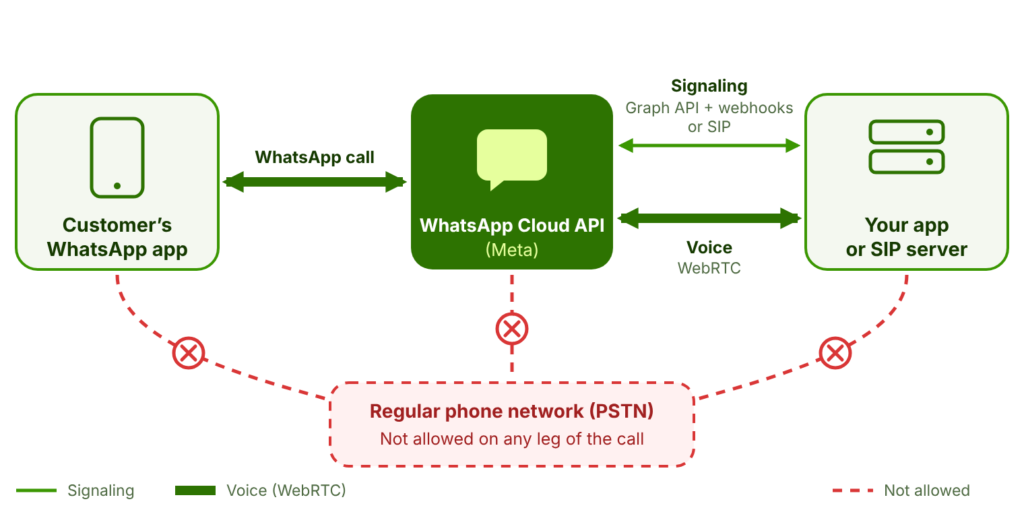
The thin line carries signaling. The thick line carries voice over WebRTC. Meta’s terms keep the call off the regular phone network.
Option 1: Graph API and webhooks
This is the default option. To get call webhooks, subscribe your app to the calls webhook field.
When a customer calls, Meta sends you a connect webhook with an SDP (Session Description Protocol) offer. SDP is a text format that describes the media of a call. To answer, send a POST request to <PHONE_NUMBER_ID>/calls with the action accept. You have about 30 to 60 seconds. Meta recommends sending pre_accept first. Then the call connects faster, and the start of the audio is not cut off (Meta user-initiated calls).
To call a customer, send the action connect with your own SDP offer. Meta returns the SDP answer in a webhook. Then you get status webhooks: RINGING, ACCEPTED or REJECTED. The terminate webhook means the call has ended (Meta business-initiated calls).
Here is a request to start a call, with the fields that Meta lists. We took the host from Meta’s Settings API example. Replace every value in braces:
curl -X POST \
"https://graph.facebook.com/{VERSION}/{PHONE_NUMBER_ID}/calls" \
-H "Authorization: Bearer {TOKEN}" \
-H "Content-Type: application/json" \
-d '{
"messaging_product": "whatsapp",
"to": "{CUSTOMER_PHONE_NUMBER}",
"action": "connect",
"session": { "sdp_type": "offer", "sdp": "{SDP_OFFER}" }
}'
If the request works, the response has a call ID that starts with wacid (Meta API reference).
Option 2: SIP for existing phone systems
If you already have a SIP server, you can use it for signaling instead of the Graph API. Turn it on with the Settings API (calling.sip.status). Meta’s rules for SIP (Meta SIP guide):
- Your SIP server must support TLS and digest authentication. TLS is mandatory, and the default port is 5061.
- Each phone number can have only one SIP server.
- When SIP is on, the calling endpoints and calling webhooks do not work.
- Your app must be in Live mode, not Development.
SIP is not a separate product. It is the same Calling API, controlled in a different way. Meta shows example setups with Asterisk and FreeSWITCH. Meta says they come “with no support or warranties of any kind” (Meta integration examples).
Who can use WhatsApp Business Calling, and in which countries?
Not every business number can use calling. Before you build anything, check that your number meets Meta’s requirements (Meta docs):
- Your business number runs on the Cloud API. The WhatsApp Business app does not qualify.
- Your messaging limit tier is at least 2,000. The tier is how many unique customers you can message in 24 hours.
- Calling is turned on for the number, and your app is subscribed to the calls webhook field. With SIP, you do not need the webhook subscription.
- Your messaging account has a credit line. You do not need business verification (Meta FAQ).
Many companies connect through a Business Solution Provider (BSP). A BSP is a company approved by Meta to connect businesses to the WhatsApp Business Platform.
Country rules depend on who starts the call:
- Customers can call you “in every location where Cloud API is available”.
- You can call customers in the same locations, unless your business number is from the USA, Canada, Egypt, Vietnam or Nigeria.
The customer’s number can be from any country where Cloud API works. Meta publishes only this list of exceptions, not a full list of countries.
| Country of your business number | Calling available | Note |
| India | Yes | Calls in both directions |
| United States | Only calls from customers | You cannot call customers from a US business number |
| Indonesia | Yes | Calls in both directions |
| Pakistan | Yes | Calls in both directions |
| Nigeria | Only calls from customers | You cannot call customers from a Nigerian business number |
| South Africa | Yes | Calls in both directions |
| Egypt | Only calls from customers | You cannot call customers from an Egyptian business number |
| Israel | Yes | Calls in both directions |
Actual as of November 2026. Source: Meta calling documentation (page updated Mar 10, 2026). Some providers publish longer exclusion lists, so also check your provider’s rules.
Call permissions and limits: how often can a business call?
You cannot call a customer without permission. So there are no outbound calls (calls from your business) until the customer agrees. Meta says: “before you can call a WhatsApp user, you must obtain their permission to do so” (Meta business-initiated calls).
To ask for permission, send a call permission request. It can be:
- an interactive message, if the 24-hour customer service window is open;
- a template message with a call permission request component, at any time.
The customer can allow calls for a limited time or permanently, say no, or ignore the request. You get the answer in a webhook (Meta call permissions).
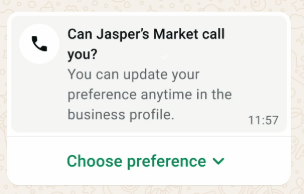
The customer sees the request in the chat, taps Choose preference and picks one of three options.
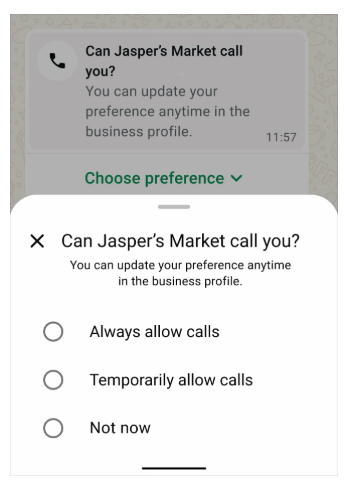
A call permission request in the chat. Image: Meta, from the WhatsApp Business Platform documentation.
The three answers the customer can choose. Image: Meta, from the WhatsApp Business Platform documentation.
The customer can take the permission back at any time, also from your business profile. Meta says: “Even if the user provides calling permission, they can revoke the granted permission at any time.” (Meta call permissions)
| Rule | Limit | Source |
| Permission requests per 24 hours | 1 request to the same customer | Meta |
| Permission requests per 7 days | 2 requests to the same customer | Meta |
| Connected calls per 24 hours after permission | 100 connected calls | Meta |
| How long a temporary permission lasts | 7 calendar days (168 hours). A permanent permission does not expire. | Meta |
| Calls nobody answers | After 2 missed calls in a row, WhatsApp asks the customer if they still want your calls. After 4, the permission ends automatically. | Meta |
Actual as of November 2026. Source: Meta call permissions (page updated Jun 26, 2026). Meta’s pages disagree on the 100-call limit. One page counts it per business phone number; the changelog per customer. Check the current text before you rely on it.
There is one exception. In Colombia and Mexico, Meta lets some businesses with good quality ratings call customers without asking first. This does not apply if the customer said no to calls or took back permission.
How much does the WhatsApp Business Calling API cost?
Calls from customers are free. Meta says: “All user-initiated calls are free.” You pay only for calls you make. The price depends on how long the call lasts and on the country of the number you call (Meta Calling API pricing).
How Meta charges for a call you make:
- Six-second steps. Meta counts call time in six-second steps and rounds up. A 56-second call is 9.33 steps, so you pay for 10.
- Country rate. The price per minute depends on the country code of the number you call.
- Volume discounts. The more minutes you call in a month, the lower the rate. The first tier is 0 to 50,000 minutes; the second is 50,001 to 250,000 minutes.
- Payment method. You must add a valid payment method before you can call.
- Permission requests. A call permission request is a message, so you pay for it at Meta’s message rates. Meta’s calling pages do not give a separate price for it.
Meta publishes its rates as downloadable files (rate cards) in 16 currencies. Call rates and message rates are listed separately. The current call rates started on April 1, 2026. They did not change on October 1, 2026. If you work through a provider, add the provider’s fee.
Example: the monthly cost of 1,000 call minutes
Say a business calls customers for 1,000 minutes a month. It also sends 200 call permission requests as template messages. All minutes are in the first tier. A permission template can be a utility or a marketing template, so we show both. We compare India and Indonesia, where businesses can call customers.
| Cost item | Who pays | India | Indonesia |
| Per-minute rate, first tier | — | $0.0053 | $0.0242 |
| Inbound minutes (calls from customers) | Free for the business | $0 | $0 |
| Outbound minutes (calls to customers, rate × 1,000) | Business | $5.30 | $24.20 |
| Permission template messages if utility (200 × $0.0014 in India, 200 × $0.0250 in Indonesia) | Business | $0.28 | $5.00 |
| Permission template messages if marketing (200 × $0.0118 in India, 200 × $0.0411 in Indonesia) | Business | $2.36 | $8.22 |
| Provider fee | Business, if you use a provider | Depends on the provider | Depends on the provider |
| Total per month, utility template | Business | $5.58 + provider fee | $29.20 + provider fee |
| Total per month, marketing template | Business | $7.66 + provider fee | $32.42 + provider fee |
Where the numbers come from:
- Call rates: Meta’s USD call rate card valid from October 1, 2026, first tier (0 to 50,000 minutes a month).
- Message rates: Meta’s USD message rate card valid from October 1, 2026.
Meta can change rates every quarter. Check the latest rate card on the Meta pricing page before you plan a budget. You can also send the permission request as an interactive message inside the 24-hour window. Meta’s pages give different prices for this case. From October 1, 2026, Meta charges service messages at the utility rate.
The more you call, the less you pay per minute. Rates from the same card, in USD:
| Minutes called in the month | India | Indonesia |
| Up to 50,000 (list rate) | $0.0053 | $0.0242 |
| 50,001 to 250,000 | $0.0038 | $0.0210 |
| 250,001 to 1,000,000 | $0.0024 | $0.0197 |
| 1,000,001 to 2,500,000 | $0.0018 | $0.0183 |
| 2,500,001 to 5,000,000 | $0.0012 | $0.0156 |
| Over 5,000,000 | $0.0008 | $0.0143 |
Actual as of November 2026. Source: Meta Calling API pricing (updated Jul 9, 2026).
Keep two things in mind:
- Each call rounds up to the next six seconds. So you pay a little more than the raw minutes.
- In this example, the same 1,000 minutes cost about 4.5 times more in Indonesia than in India.
How to add WhatsApp calling: build it yourself or use a provider
You have three options:
- Do it yourself. Connect to the Cloud API and control calls through the Graph API or your own SIP system.
- Use a WABA provider. A provider adds its own tools on top of the same Calling API.
- Use GREEN-API. Make and answer calls from an ordinary WhatsApp number, without WABA. You pay a flat monthly price (see calls without WABA).
SIP is not a separate option. It is only another way to control calls in the Calling API (see how calls work).
The choice depends on your team. Do you have a developer who knows WebRTC? Do you already have a SIP phone system? If not, a provider can save you weeks of work. A WABA provider may add its own fee to Meta’s rates. GREEN-API charges a flat monthly price instead.
| Path | What you need | Good for | Trade-off |
| Cloud API directly, signaling via Graph API | A developer who can handle WebRTC, webhooks and SDP | Teams that build their own calling app | Most control, but you build and run everything |
| Cloud API directly, signaling via your SIP system | A SIP server with TLS and digest authentication | Companies with an existing phone system | Meta’s SIP rules apply, and Meta gives no support for its example setups |
| WABA provider | A WABA account with the provider, with calling enabled | Businesses that already have WABA | Faster start, but you pay Meta’s per-minute rates plus the provider’s fee, and Meta’s permission rules apply |
| GREEN-API | A GREEN-API instance on the Ultra plan | Businesses without WABA, and teams that call a lot | $36 a month with unlimited calls and no per-minute rates. One-to-one calls only, and WhatsApp’s rules for ordinary accounts apply. |
WABA providers follow Meta’s country rules and can add their own exclusions. Some still offer calling only in beta, so check the status before you sign up.
How many providers offer calling? In November 2026, we checked the websites of 23 well-known WhatsApp providers. Only 13 show WhatsApp calling as a regular feature. The other 10 call it a beta or mention it only in news or AI material. Some do not show it at all, or we could not confirm it. All 13 work through WABA, so Meta’s per-minute rates and permission rules apply. Meta does not publish an official list of providers that support calling.
| Provider | WhatsApp calling on its own pages | Note |
| GREEN-API | Yes, without WABA | Inbound and outbound. Unlimited calls for $36 a month, no charge per minute (see the next section) |
| Sinch | No | Not on its WhatsApp pages |
| Vonage | No | WhatsApp messaging only |
| Tata Communications (Kaleyra) | No | Not on its WhatsApp page |
| Zoho | No | Only a user feature request |
| AiSensy | Not confirmed | Only a beta post from February 2025 |
| Kommunicate | Not confirmed | No product page found |
| Genesys | Only in news | Inbound calls; outbound expected in 2027 |
| Haptik | Only in AI material | AI voice agents; the Calling API is not named |
| Bird | Beta | India, Indonesia, Brazil and Mexico only |
| Exotel | Beta | Beta post from August 2024 |
| Twilio | Yes | Inbound and outbound |
| Infobip | Yes | Inbound and outbound |
| 360dialog | Yes | Inbound and outbound |
| Telnyx | Yes | Inbound and outbound |
| 8×8 | Yes | Through an account manager |
| Route Mobile | Yes | Described in a blog post |
| Wati | Yes | Calls in the team inbox |
| respond.io | Yes | Calls in the inbox |
| Interakt | Yes | Calls in the dashboard |
| Chakra | Yes | Inbound and outbound |
| YCloud | Yes | Inbound and outbound |
| Zoko | Yes | Inbound and outbound |
| Qiscus | Yes | Calls in the inbox |
Checked on 13 November 2026 on each provider’s own website. Providers change their offers often, so check before you choose.
Whatever you choose, answer three questions first:
- Which countries will you call?
- How many minutes a month will you call?
- Who on your team will maintain the integration?
No WABA? What you can do with calls using a WhatsApp API gateway
Meta’s Calling API works only with WABA. Your number must run on the Cloud API, and the WhatsApp Business app does not count (Meta docs).
A WhatsApp API gateway such as GREEN-API works differently. It connects an ordinary WhatsApp number as an instance: one WhatsApp number connected to the GREEN-API gateway.
What you get with GREEN-API:
- No WABA. Connect an ordinary WhatsApp number in the console.
- No messaging limit to reach first. Meta’s requirement of 2,000 recipients a day does not apply.
- A flat price. The Ultra plan costs $36 a month with unlimited calls. You do not pay per minute.
- Calls and messages in one API. Answer a call, then follow up in chat with the same instance.
GREEN-API gives you four tools for calls:
- Make and answer voice calls. GREEN-API has its own WhatsApp calling API for ordinary numbers. It is not Meta’s Calling API and does not need WABA. The CallsDial method starts a call, CallsAccept answers it, and the voice goes over WebRTC. You can make one-to-one calls only, and you can record them. Calls are included in the Ultra plan, with no limit on minutes. Some older instances need to scan a new QR code before calls work. GREEN-API support can tell you if yours does (GREEN-API Calls API docs).
- See call history. The call history methods LastIncomingCalls and LastOutgoingCalls return your calls for a time window. You set the window in minutes, and the default is 1,440 minutes (one day).
- Get a notification about an incoming call. The gateway sends an incomingCall webhook to your server. To get it, turn on Get notifications about calls in the instance settings. You can also use the incomingCallWebhook
- Reply to a missed call with a message. Send one request with the SendMessage method.
| Task | Calling API with WABA | GREEN-API WhatsApp API gateway |
| Answer a voice call in your app | Yes, through Graph API or SIP | Yes, with GREEN-API’s Calls API (CallsAccept). One-to-one calls only. |
| Call a customer | Yes, after the customer gives permission. Not from business numbers in the USA, Canada, Egypt, Vietnam or Nigeria. | Yes, with CallsDial. Call only customers who agreed to it: WhatsApp’s rules for ordinary accounts apply. |
| See call history | Save the call webhooks yourself. For example, terminate has the start time and length of the call. | LastIncomingCalls and LastOutgoingCalls |
| Reply to a missed call with a message | Send a message with the Cloud API. A call from the customer opens or extends the 24-hour customer service window, even if you do not answer, so you can send a free-form message. | One SendMessage request |
| How you pay | Meta’s rates per minute and per message, plus any provider fee | A GREEN-API plan for each instance. Calls need the Ultra plan. GREEN-API does not charge per minute. |
GREEN-API also offers WABA, but its WABA service does not support Meta’s Calling API yet. GREEN-API is now asking customers if they need calls on WABA. If your business needs them, write to GREEN-API support.
Reply to a missed call with one request
This Python example gets the incomingCall webhook and sends a short message to the person who called. Take apiUrl, idInstance and apiTokenInstance from your console:
import requests
from flask import Flask, request
API_URL = "{{apiUrl}}"                   # apiUrl from the GREEN-API console
ID_INSTANCE = "{{idInstance}}"
API_TOKEN = "{{apiTokenInstance}}"
app = Flask(__name__)
replied = set()  # idMessage values that already got a reply>/code>
@app.post("/webhook")
def webhook():
data = request.get_json(silent=True) or {}
if (
data.get("typeWebhook") == "incomingCall"
and data.get("status") == "declined"
and not data.get("isGroup")
and data.get("idMessage") not in replied
):
replied.add(data["idMessage"])
url = f"{API_URL}/waInstance{ID_INSTANCE}/sendMessage/{API_TOKEN}"
payload = {
"chatId": data["from"],  # <country code><phone number>@c.us
"message": "We missed your call. Reply here, and we will help you in chat.",
}
requests.post(url, json=payload, timeout=10)
return "", 200
You get the incomingCall webhook twice for each call. The first has the status offer when the call starts. The second has a final status when the call ends. Both webhooks have the same idMessage, so the code replies only once per call.
What we saw in our test on a business instance on 13 November 2026:
- Nobody answered. All three calls ended with the status declined. The missed status never came, so the code checks for declined.
- We answered. The webhooks were offer and then pickUp, so the code sent nothing. No webhook came when the call ended.
See the full format in the incoming call notification reference.
Call only people who expect it
Call and write only to people who expect to hear from you. WhatsApp’s rules apply to every number, including a number on a gateway. WhatsApp asks users to “only send messages to those who have contacted you first.” It also asks them not to “bulk message, auto-message, or auto-dial using WhatsApp.” It uses “machine learning technology and reports from users to detect and ban accounts that send unwanted automated messages” (WhatsApp Help Center).
What it costs compared with Meta’s rates
The GREEN-API Ultra plan costs $36 a month for one instance. It includes unlimited calls, with no charge per minute (source: GREEN-API calling page, checked on 13 November 2026). With Meta’s Calling API, you pay for every minute you call. At Meta’s first-tier rates, calls cost more than $36 a month after about 1,490 minutes in Indonesia. In India, this happens after about 6,800 minutes.
You can test the GREEN-API HTTP API on the free Developer plan. It works with up to 3 chats and 1 instance (source: plans, checked on 13 November 2026). For calls, choose the Ultra plan. Sign up in the GREEN-API console to get your first instance.
When should a business use WhatsApp calls? Use cases and good practices
Call when a chat alone is not enough. A call should continue a conversation that the customer started. Three typical cases:
- Customer support. A customer describes a complex problem in chat, and an agent calls to solve it faster.
- High-value sales. A buyer asks about an expensive product. A salesperson calls to answer questions and help the buyer decide.
- Order and appointment checks. A business confirms a delivery address, a time slot or a change that is hard to explain.
Follow these rules:
- Ask before you call. The WhatsApp Business Messaging Policy lets you contact only people who agreed to it. WhatsApp also recommends asking separately for permission to call.
- Give an easy opt-out. Tell people how to stop your calls. The same policy requires clear instructions for this.
- Call in business hours. Call during the customer’s working day, not at night.
- Keep calls short. Move long follow-ups back to chat.
WhatsApp may limit how many calls your business can make, and customers can block or report you.
No one can fully guarantee that WhatsApp will never block a number. But you can greatly lower this risk if you follow GREEN-API recommendations. Get consent, keep sensible pauses between calls and messages, and let people opt out.
⚠ Never ask for payment details or codes on a call
Do not ask customers for card numbers, passwords or verification codes during a call. Scammers use this trick, so customers will report your number, and WhatsApp may block it.
WhatsApp Business Calling API: FAQ
Is the WhatsApp Business Calling API still in beta?
Meta does not say. Its calling documentation (updated Mar 10, 2026) does not call the Calling API either beta or generally available. Some parts are still limited. For example, businesses from the USA, Canada, Egypt, Vietnam and Nigeria cannot call customers. Some newer features are already generally available, for example, voicemail since Jun 25, 2026. Check Meta’s calling page for the current status.
What does “Calling APIs cannot be enabled for this phone number” mean?
This is error 138015, “Calling cannot be enabled”. Your number does not meet Meta’s requirements for calling. Check that its messaging limit tier is at least 2,000. This is the only fix Meta lists. Also check that the number runs on Cloud API. For the full list of requirements, see Who can use WhatsApp Business Calling above (Meta troubleshooting).
Can I use WhatsApp Business Calling through Twilio?
Yes. According to Twilio’s documentation, Twilio supports WhatsApp Business Calling in Twilio Programmable Voice. You also need Twilio’s WhatsApp Messaging. The page does not say if the feature is in beta. Twilio adds its own fee to Meta’s rates. To compare all options, including calls without WABA through GREEN-API, see How to add WhatsApp calling above.
Is there sample code for the WhatsApp Business Calling API on GitHub?
Not from Meta. Meta’s whatsapp-api-examples repository covers messaging, templates and webhooks, but not calls. Meta’s documentation has SIP setup examples for Asterisk and FreeSWITCH, with no support or warranties. Use Meta’s calling documentation as your main reference. Meta does not check other people’s repositories. If you do not need WABA, see the Python example above and the GREEN-API Calls API docs.
Can I make WhatsApp calls through an API without WABA?
Not through Meta’s Calling API: it works only with a number on Cloud API. A WhatsApp API gateway such as GREEN-API connects an ordinary WhatsApp number. It has its own Calls API with the CallsDial and CallsAccept methods. Calls come with the Ultra plan: unlimited calls for $36 a month. See No WABA? What you can do with calls above.