
In detail
This new feature aims to ensure that users are no longer tied to backing up their chat history exclusively through Google Drive. Instead, they will have the option to use WhatsApp’s own servers to securely store their chats. WhatsApp plans include 2GB of free storage and mandatory end-to-end encryption for all backups users choose to store on its servers.
WhatsApp offers a generous 2GB of free storage for this purpose, and crucially, all backups will be protected by end-to-end encryption by default, ensuring maximum privacy.
When will it be available?
Some users may already notice a new option on the backup screen that allows them to select WhatsApp as their backup provider. With this update, WhatsApp is giving some beta testers access to its own cloud backup storage. This feature gives them the flexibility to choose which provider they want to use and allows them to switch between them at any time.
How to enable this
WhatsApp recently updated the chat backup screen, making the process of switching backup providers to WhatsApp Cloud Storage as simple as possible. On this screen, users can now see two different backup provider options: “WhatsApp Cloud Storage” and “Google Storage.” If users choose to back up their chat history to WhatsApp servers, they will need to complete a few additional steps before successfully completing the setup.
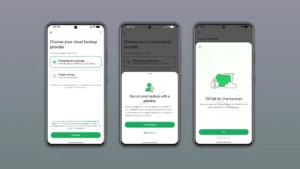
It’s important to note that backups on WhatsApp servers are protected by end-to-end encryption by default, so you will need to enable this feature before WhatsApp can create your first backup.
What encryption options are available for WhatsApp backups?
End-to-end encryption is a requirement for all backups stored on WhatsApp servers. Users will not be able to disable this feature if they wish to continue using WhatsApp Cloud Storage. WhatsApp uses a password as the default encryption method. Additionally, users have the option to encrypt their backup with a unique 64-character encryption key. This ensures that neither WhatsApp nor Meta can access backups, ensuring a high level of privacy for users.
Conclusion
WhatsApp is preparing its own backup cloud, where Android users will be able to store chats on WhatsApp servers instead of Google Drive. While this feature is gradually being rolled out to beta testers, it’s another step the messenger takes toward keeping all user correspondence within its ecosystem.
At GREEN-API, we monitor all WhatsApp updates to provide you with the latest news and solutions for automating your business processes. Stay tuned to stay up-to-date with all the latest developments!