


WhatsApp API for Business
Send and receive text, photo and video using stable WhatsApp API gateway
Free for Developers
GREEN Light to Your Dreams!
All systems operational





Start sending messages for free
Features

Text
Sending and receiving text messages with emoji support

Media
Sending and receiving Images, Videos, Documents and Files up to 100MB

GPT
Integration with ChatGPT

Calls 🔥
Making calls and managing call settings

Contact
Sending a business card of the company

Groups
Creating groups, managing group members, installing a group avatar, etc

Statuses
Sending and receiving statuses. Collecting delivery statistics and viewing statuses

Checking the WhatsApp number
Checking the availability of WhatsApp on the phone number

Avatars
Getting and installing contact avatars

Journals
Getting the history of sent and received messages for all time

Link Builder
Create a WhatsApp chat link with a pre-filled message

Poll
Sending and receiving surveys. Getting survey statistics

All functions...
All functions for working with WhatsApp


Chatbots samples











WhatsApp calls
GREEN-API supports WhatsApp calls via API: receive and make voice calls right from your system. Chats and calls on a single number.

Pricing Plans
Monthly
Annually
Number of chats
Number of WhatsApp availability checks
Send and receive text, video, audio, images, contact documents, geolocation, links
File sending
Sending messages with buttons
Unlimited messages
Status sending
Group support
Contact and group avatar retrieval
Number of call recipients
Developer
$0 per month
3
100

100MB
10
3
 +3 months free
Business
$12 per month
Unlimited
30,000
100MB
100
10
Ultra
$36 per month
Unlimited
30,000
100MB
Unlimited
Unlimited
White Label support
API instance management
Personalized technical support
Dedicated servers
Daily billing
Volume discounts
Credit line
Unlimited calls
Partner
$0.40 per day
Partner Ultra
$1.20 per day

WhatsApp Chatbots with GPT and Libraries by GREEN-API
In today's world, it's hard to imagine automating routine tasks without the help of ChatGPT. GREEN-API keeps up with the times and offers ready-made chatbot integrations with AI. We've made it easy for you by providing libraries in popular programming languages to integrate various AI models into WhatsApp.



Scan the QR code. Choose your preferred language. Start chatting with ChatGPT by selecting item 14 in the menu.

Cases

Integration

Support
Call centers

Cascade mailings

SMS replacement

Chatbots
GPT
Free proxy server for WhatsApp
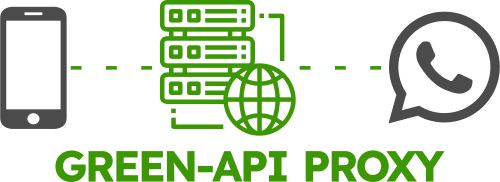
We have developed a free proxy server for WhatsApp. The proxy server will be useful to you in cases where access to the WhatsApp messenger is prohibited in your country for any reason. To bypass these restrictions, use our proxy.
For more information on connecting to the free proxy server, read our article.
Demo chatbot

The code of the Demo chatbot bot is open source. You can easily develop your own bot.
 Demo Go chatbot repo on GitHub
Mobile application
Access to your data is always at hand. Receive and send messages, change work parameters, and pay for licenses when it's convenient for you.

Free Link Generator
Create convenient links for chatting on WhatsApp. Customers will be directed to your chat with a pre-filled message. Link Builder
API for programmers
Create a chatbot or integration with your CRM system in just a couple of hours.
Use any programming language to integrate with WhatsApp API: PHP, JavaScript, 1С, Python, Java, C#, VBA, etc.
For your business
Increase your sales, get close to your clients, interface your CRM with WhatsApp and get more orders and more satisfied clients.
Save on SMS mailings. Use WhatsApp API for interaction with your clients.
We can interface your CRM system with WhatsApp API. Leave a request for connection.

FAQ
How to send a file?
The GREEN-API service allows you to send files in several ways: from an external storage using the SendFileByUrl method, from a personal computer using the SendFileByUpload method, from a personal computer with mass mailings using the UploadFile methods + SendFileByUrl. Read more in our article
What types of files does the API support?
Files with extensions jpeg, png, mp4, mp3, docx, pdf, etc. are successfully sent and received via the API, and are displayed correctly on all devices. Read more in our article
How to use a proxy server in WhatsApp?
The proxy server allows you to use WhatsApp even in countries where it is not available. The GREEN-API allows users to use a proxy server for free. To access WhatsApp via the Green-API proxy server, you need to set the settings from our article
How to identify your WhatsApp subscribers?
Add all your customers to your address book on your phone, post any status and get statistics using the GetStatusStatistic method. Read more in our article
How to protect a number from being banned?
Warm up the number, add keywords, contact by name, add questions to the newsletter to receive answers from customers. Read more in our article
How to integrate WhatsApp with ChatGPT?
To integrate with your favorite AI, you can use one of our libraries: WhatsApp GPT Bot Python Library, WhatsApp GPT Bot Go Library, or WhatsApp Chatbot JS v2 with OpenAI GPT integration.
How to make mailing lists without the risk of blocking?
Send messages only to customers who have added you to contacts. Give the client the opportunity to unsubscribe. Increase the interval between messages. Read more in our article
How do I call a WhatsApp number?
You can call a WhatsApp number simply from your phone. But if you make many calls, it is more convenient to handle them via API, just like messages. All conversations will be in one system, with recording and history.Unlike messages, calls use the WebRTC protocol. All calls are recorded automatically and saved in the call log. Call recordings and history can be retrieved via the API.For more details, see the calls documentation.
Do I need WABA to make calls via the API?
No. The instance is authorized in your account by scanning a QR code from the WhatsApp Business or regular WhatsApp mobile app.
Can I receive incoming calls?
Yes. An incoming call is signaled by the inc-call state; the info object contains the caller ID and, if WhatsApp provides it, the name. Accept the call with CallsAccept or decline it with CallsReject.
How do I add calls to a browser app?
Use the @green-api/whatsapp-api-calls-client-js library: it maintains the CallsRtc connection, calls the call-control methods and transmits audio via WebRTC. A ready-made softphone demo runs at voip.green-api.com and opens in the browser with nothing to install.
All FAQ questions
Go to the FAQ section for a complete list of questions