
Key takeaways for businesses and API users
If you only have a minute, here are three changes worth acting on now:
- The group limit has grown from 1,024 to 1,500 members. If your integration or CRM checks group size against the old limit, update that check. Broadcasting to very large groups is still not recommended.
- Customers will be able to send text that can be read only once and cannot be copied. If a customer sends an order number or payment details this way, your bot or CRM may not receive the text. Plan a response for such messages.
- A single message may get many reactions. There can be up to 20 sticker reactions per message, and one person can add several. If you count reactions as feedback, you will need to rethink that logic.
Groups of up to 1,500 members
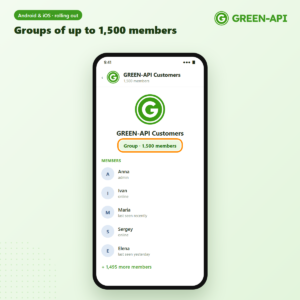
WhatsApp is raising the maximum group size from 1,024 to 1,500 members on Android and iOS.
How it works
The new limit applies to existing groups automatically — admins don’t need to turn anything on. A group that already has 1,024 people can take 476 more. The limit also applies to groups inside communities; the community announcement channel is not affected.
Why it matters
Large communities — schools, clubs, professional associations — no longer have to split their audience across several groups.
What it means for businesses
If you manage groups via the API, check whether the 1,024 limit is hard-coded anywhere: in validation, in warnings to managers, in reports. Our recommendation stays the same: don’t use groups with more than 1,000 members for broadcasts — very large groups carry a higher risk of delivery failures.
Status
Gradually rolling out on Android and iOS.
View-once text messages
The view-once mode, previously available for photos, videos and voice messages, is now coming to text.
How it works
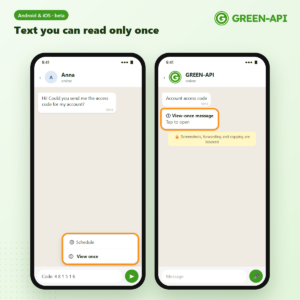
To send such a message, type your text, press and hold the send button and choose “View once”. The recipient opens the message on a separate screen where screenshots, forwarding and copying are blocked. Once the screen is closed, the text disappears for both sides, and the chat shows a note that the message was opened. Scheduling a view-once message is not possible yet.
Why it matters
Handy for passwords, access codes and other details that shouldn’t stay in the chat history.
What it means for businesses
For support teams and bots, this is a new type of incoming message whose text most likely can’t be read or saved to a CRM. Prepare a scenario in advance: for example, the bot replies, “Please send this information as a regular message”. We’ll check how these messages arrive via the API once the feature is released.
Status
In beta on Android and iOS, available to some testers.
WhatsApp’s own cloud backup
WhatsApp is launching its own cloud storage for chat backups — an alternative to Google Drive on Android and iCloud on iOS.
How it works
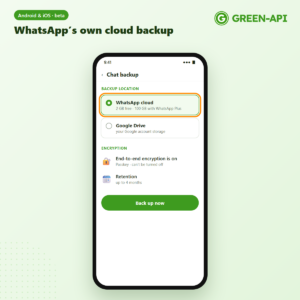
Backup settings now let you choose a provider. You get 2 GB for free, and WhatsApp Plus subscribers get 100 GB. Backups in WhatsApp’s cloud are always end-to-end encrypted: with a passkey by default, or with a 64-digit key if you prefer. Encryption can’t be turned off. A backup is kept on the servers for up to four months. You can switch providers at any time.
Why it matters
Backups with media quickly eat up free space in Google Drive and iCloud. Dedicated storage solves that.
What it means for businesses
If you move a work number to a new phone, WhatsApp’s cloud is one more way to keep the chat history. Make sure you remember or safely store the encryption key: without it, the backup can’t be restored.
Status
In beta on Android and iOS.
Sticker reactions — up to 20 per message
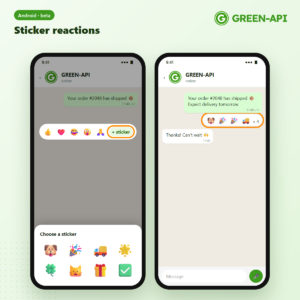
You can now react to a message not only with an emoji but also with a sticker from your collection.
How it works
A new button next to the reaction tray opens the sticker keyboard. Both static and animated stickers work. Unlike emoji, where you can leave one reaction per message, you can add several stickers, including identical ones. The limit is 20 sticker reactions per message.
Why it matters
Reactions become more expressive, especially in groups.
What it means for businesses
If you use reactions as quick customer feedback (for example, 👍 to confirm an order), keep in mind that one person may now leave several reactions, and they may be stickers rather than emoji.
Status
In beta on Android.
Zaps — instant disappearing photos and videos
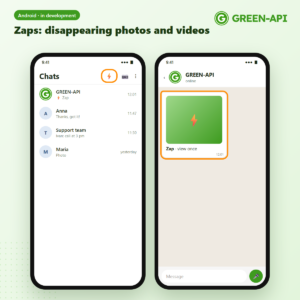
WhatsApp is building a camera for instant photos and videos that disappear after viewing. The feature was first called Instants and is now called Zaps.
How it works
A lightning-bolt button at the top of the Chats tab opens the camera. A photo or video can be viewed once and then disappears. Zaps are end-to-end encrypted. At first, the feature worked only between mutual contacts; now WhatsApp plans to allow sending them to any contact and to groups. Zaps appear right in the conversation, and several in a row are grouped.
Why it matters
It’s WhatsApp’s answer to similar features in Instagram and other social apps: quick, spontaneous shots that don’t stay in the chat history.
Status
In development for Android, not yet available even to beta testers.
A Contacts tab instead of Communities
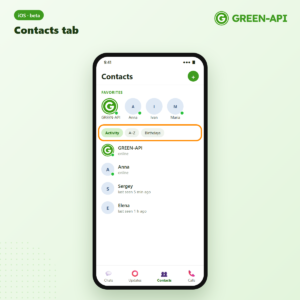
On iOS, as on Android earlier, a separate Contacts tab is appearing.
How it works
The tab replaces Communities in the bottom bar. Favorite contacts are at the top, followed by the full list, which you can sort alphabetically, by activity (people who are online are marked with a green dot) or by upcoming birthdays. You can also add a new contact here by phone number or username.
Why it matters
See at a glance who is online and start a conversation without opening a chat.
Status
In beta on iOS; Android testing started earlier.
A floating bottom navigation bar on Android
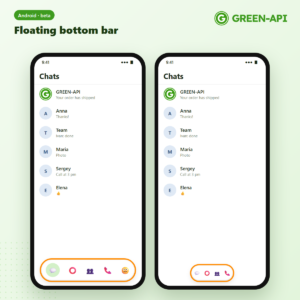
After several weeks of experiments, WhatsApp is releasing the new bottom bar to beta testers.
How it works
The bar floats above the screen without touching its edges; the labels under the icons are gone, and the selected tab is highlighted with a circle. When you scroll down, the bar shrinks into a compact pill; when you scroll up, it expands again. The bar can hold five tabs, including You.
Status
In beta on Android.
Shared chat themes
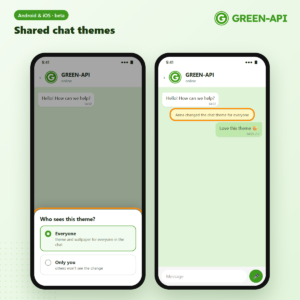
A chat theme and wallpaper can now be applied not only for yourself but also for the other person or for everyone in a group.
How it works
After you pick a theme, WhatsApp asks whether to apply it for everyone or just for you. On iOS, “Everyone” is selected by default. When the theme changes for everyone, a system message in the chat shows who changed it. If you don’t like the theme, you can change it back.
What it means for businesses
Chats with customers will show new system messages about theme changes. If your integration processes every incoming event, make sure these messages don’t reach managers as customer requests.
Status
In beta on Android and iOS.
Other updates in brief
- Location in status (Android, in development). You’ll be able to share your location as a status directly, without a photo and a location sticker.
- Dual camera (Android, beta). Shoot photos and videos with the front and back cameras at once; the small window can be moved around the screen.
- Text stickers (Android, beta). Creating a text sticker has moved to the sticker keyboard, and there are now 10 styles instead of 5.
- Liquid Glass on iOS (beta). The glass design has reached the chat info screen and the photo editor toolbar.
Conclusion
The theme of these two weeks is privacy and scale. WhatsApp is giving users more ways to share things that don’t stay in the chat — view-once text, Zaps, encrypted backups on its own servers — while expanding large communities with groups of up to 1,500 members.
For businesses, this means three practical steps: update your group size checks, prepare a response to customers’ view-once messages and rethink how you count reactions, if you do.
At GREEN-API, we follow WhatsApp updates and check how they affect work through the API. Subscribe to our blog so you don’t miss the next updates.