
What research says about reminders
The figures below come from two reviews whose authors pooled the results of dozens of studies on patient reminders.
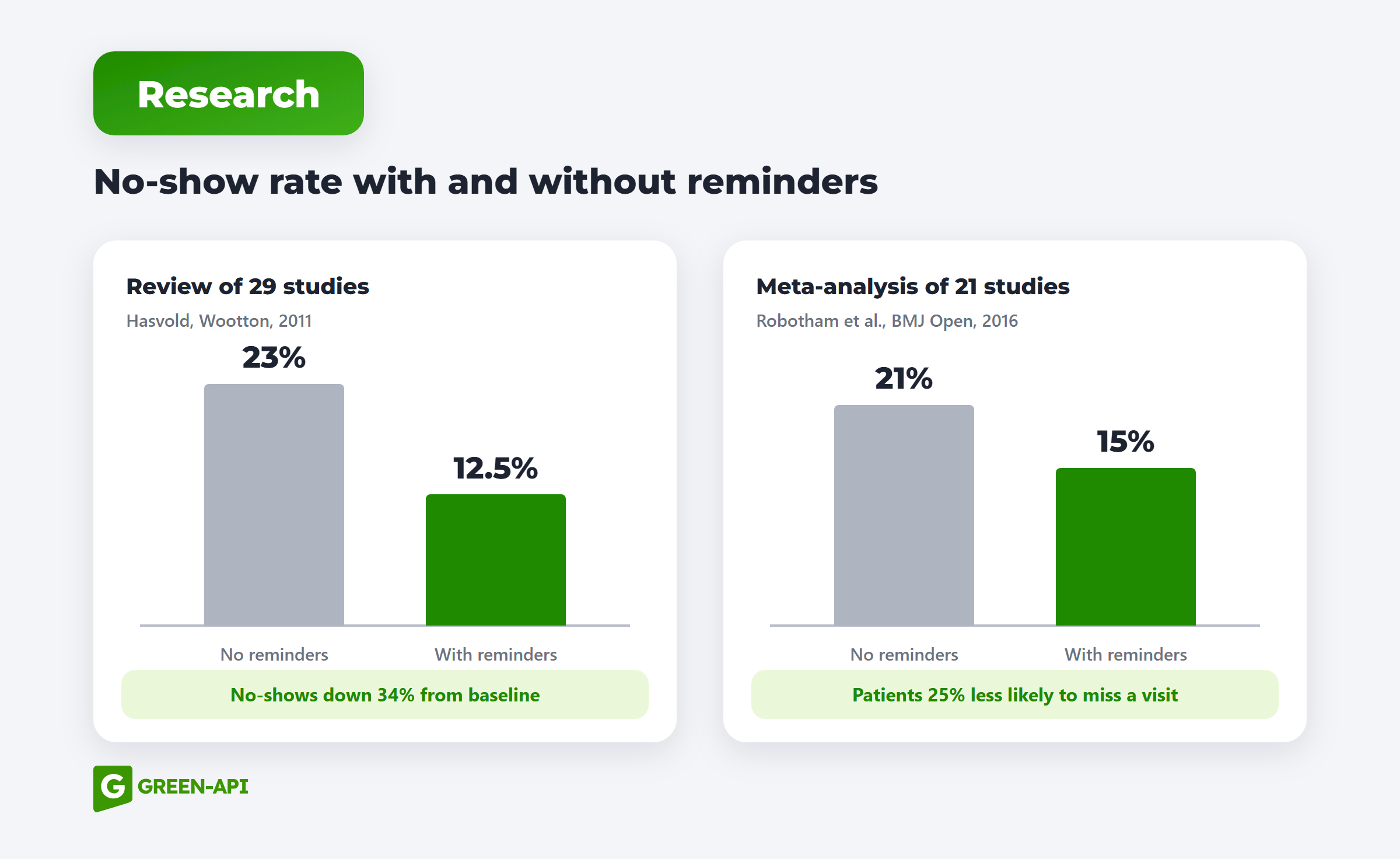
A systematic review of 29 studies (Hasvold, Wootton, 2011). Phone and SMS reminders cut the no-show rate by 34% of the baseline level on average. In a typical study, 23% of patients missed their appointment without reminders and 12.5% with them. A call from staff worked better than an automated message: a 39% reduction against 29%.
A meta-analysis of 21 studies with about 16,000 patients (Robotham et al., BMJ Open, 2016). With text notifications, the no-show rate fell from 21% to 15%: patients were 25% less likely to miss a visit. Several notifications worked better than one.
“34% of the baseline” does not mean minus 34 percentage points. If 10% of your patients miss appointments, a reduction of that size brings it to about 6–7%, not zero. Both reviews studied SMS and calls, not messengers. Only your own data will show what a messenger does for your clinic.
The patient journey: a message for every step
The examples use a fictional clinic, Maple Clinic, a doctor, Dr. Emma Carter, and a patient, Laura. Curly brackets mark the fields your practice management system or CRM fills in.
1. Booking
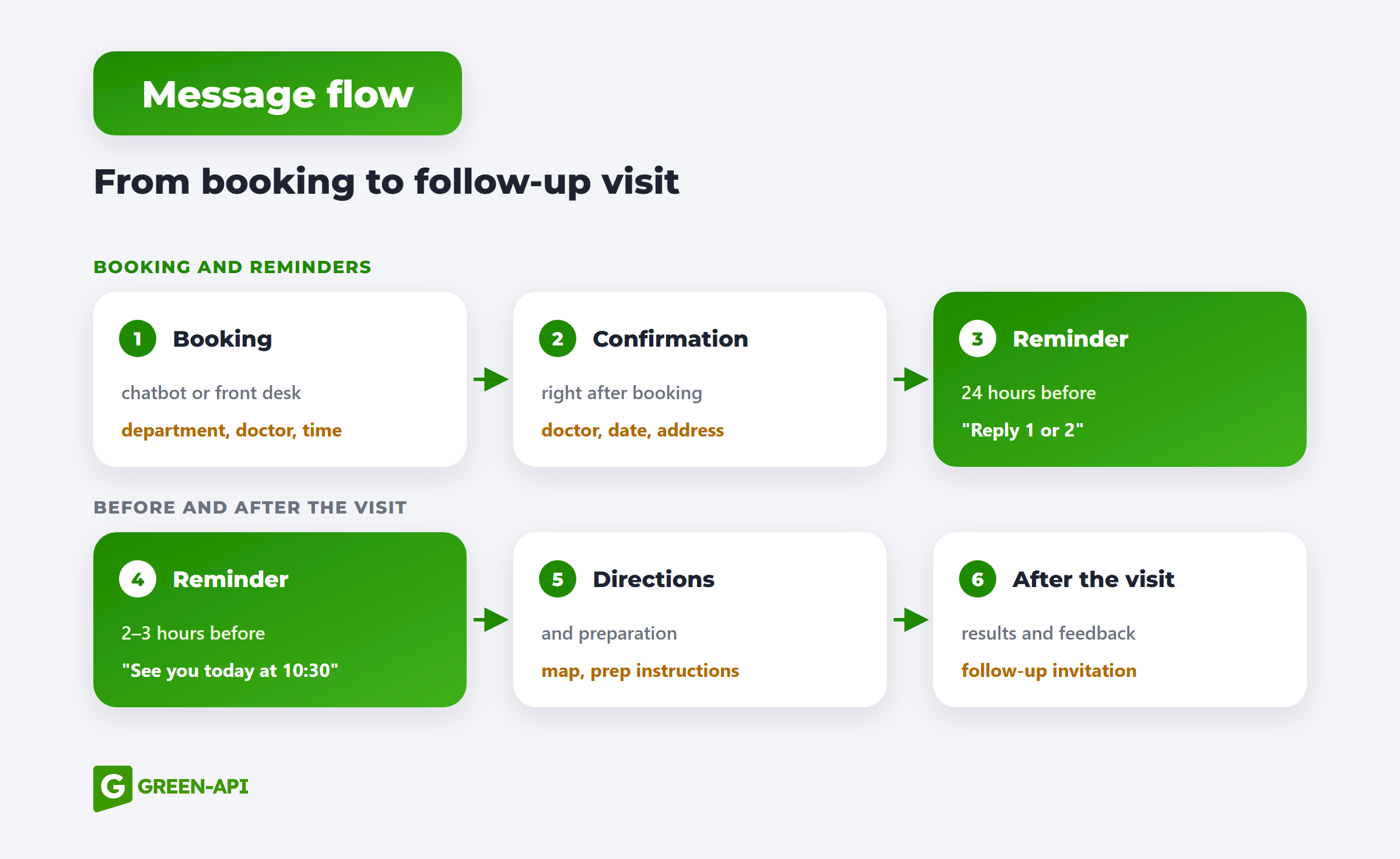
A front desk admin or a chatbot handles bookings in the messenger. A clinic chatbot helps the patient choose a department, doctor, date and time. Questions about symptoms and treatment go to an operator.
Hello! This is Maple Clinic. To book an appointment, choose:
1 — general practitioner
2 — dentist
3 — lab tests
4 — talk to the front desk
2. Booking confirmation
Send it right after the booking. Include everything the patient needs so they don’t have to call: doctor, date, address and how to reschedule.
Laura, your appointment at Maple Clinic is booked.
Doctor: Dr. Emma Carter
When: March 14, 10:30 am
Address: 12 Maple Street, 3rd floor
If your plans change, reply in this chat and we’ll reschedule.
3. Reminders 24 hours and 2–3 hours before
Send two reminders. A day ahead, the patient still has time to reschedule and the clinic can offer the slot to someone else. A message two to three hours ahead reminds those who got busy and forgot.
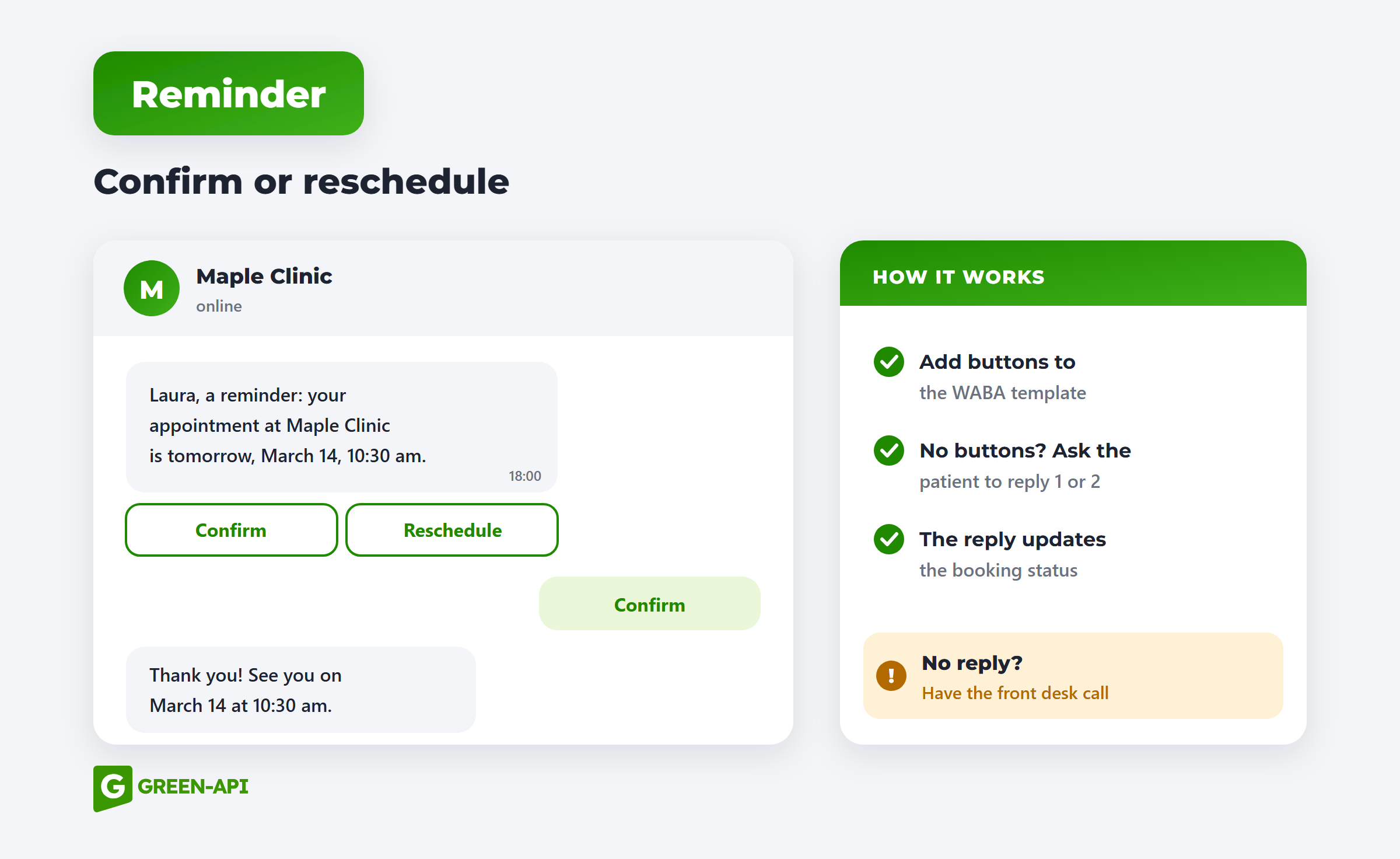
Laura, a reminder: your appointment at Maple Clinic is tomorrow, March 14, at 10:30 am.
Reply 1 to confirm or 2 to reschedule.Laura, we’re expecting you today at 10:30 am. Running late? Let us know and we’ll tell the doctor.
With WABA, you can add “Confirm” and “Reschedule” quick reply buttons to the template. Otherwise, ask for a number: a script reads it more reliably than free text. A “1” updates the booking status in your system, a “2” makes the bot or admin offer free slots. If the patient doesn’t answer, have the front desk call: according to the 2011 review, a staff call works better.
4. Directions and preparation
How to find us: the entrance is from the courtyard, free parking next door. Map: {link}. Please bring your ID and insurance card.
Don’t explain test preparation in your own words. Link to the instructions approved by your doctors.
Laura, your lab tests are booked for March 14 at 8:00 am. How to prepare: {link}.
5. After the visit
Results are ready — no diagnosis, no numbers:
Laura, your results are ready. You can view them in your patient portal: {link}.
Feedback — the next day:
Laura, thank you for choosing Maple Clinic. How would you rate your visit from 1 to 5? Your answer shows us what to improve.
Follow-up visit — if the doctor scheduled one:
Laura, Dr. Carter recommended a follow-up visit in April. Shall we book it? Reply “yes” and we’ll send available times.
What you can’t send to a patient in a messenger
Don’t send patients anything covered by medical confidentiality: diagnoses, test results, names of conditions or medications. Phones get picked up by family members, and notifications show on the lock screen.
Health data is protected by law in most countries, and in some of them even the fact that a person visited a clinic is confidential. Follow your local laws on medical and personal data and agree with your clinic’s legal adviser on what and how you write to patients.
In practice:
- write “your results are ready, see your patient portal,” not the results themselves;
- don’t name a narrow specialty if it hints at a diagnosis;
- don’t ask patients to send discharge summaries, scans or ID documents in the chat;
- don’t consult in the chat: health questions are for the doctor at the appointment.
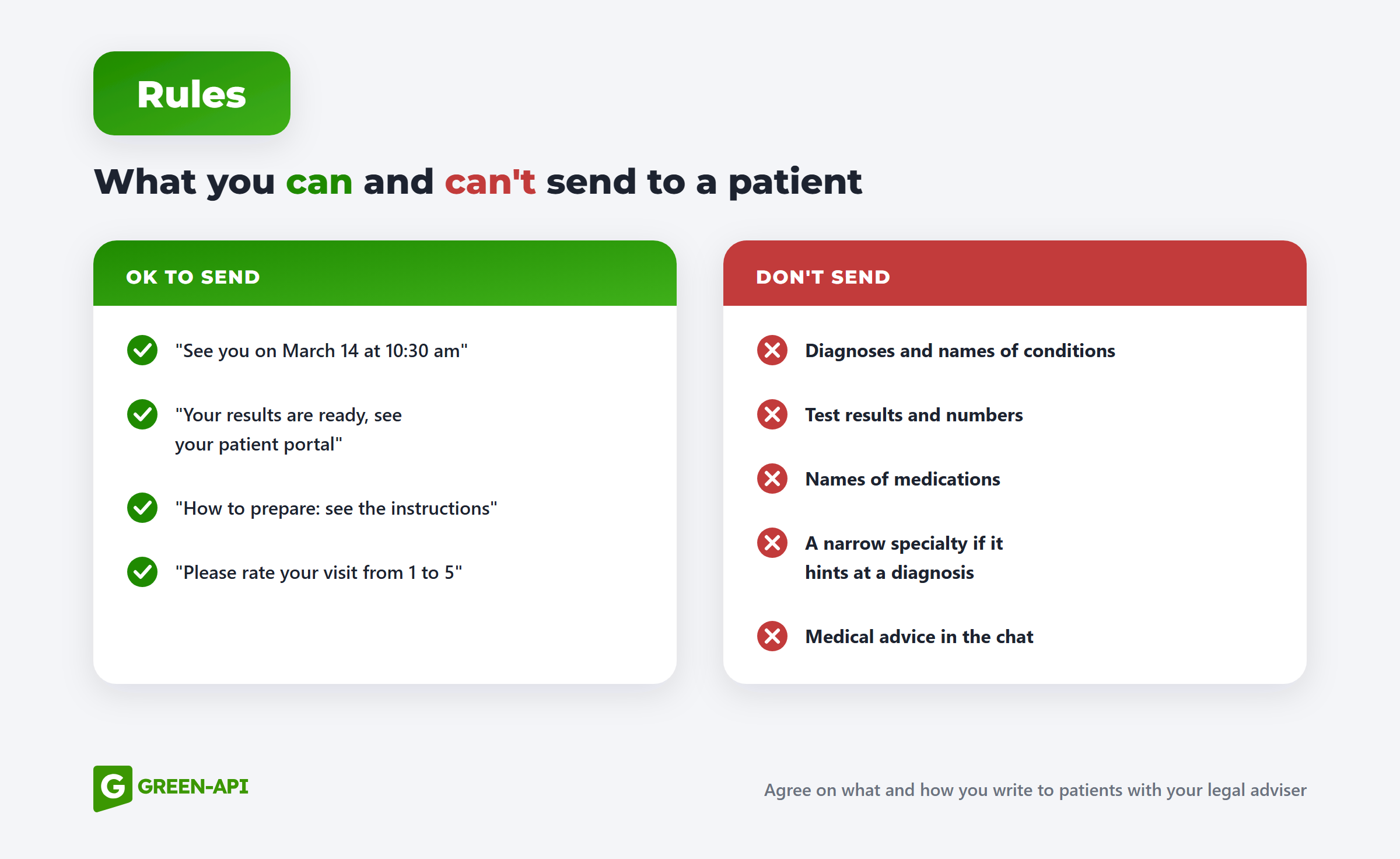
WhatsApp policy says the same: don’t send or request health information if local law requires heightened protection for it.
You need two consents: to process personal data and to receive messenger notifications. Ask for the second one as a separate checkbox at booking: “I agree to receive appointment messages on WhatsApp or Telegram.” WhatsApp policy also requires that the person gives you their number and agrees to receive messages. At booking, also ask which messenger the patient prefers. If a patient asks you to stop messaging, opt them out right away.
Platform limits
WhatsApp Business API (WABA)
To message a patient first through WABA, you need a template approved by Meta. Appointment reminders fit the Utility category: a service message about a specific booking. It must not promote anything. Add “plus a discount on teeth cleaning” and Meta will move the template to the Marketing category or reject it.
To create a reminder template, use the CreateTemplate method. How to pass moderation is covered in the article on WABA message templates.
WhatsApp policy prohibits promoting medical products and drugs, so a template with a discount on procedures may not pass moderation. More details are in the overview of WABA restrictions and prohibited content.
WhatsApp via QR code and Telegram
With these channels, there’s no template approval: you send the text you want. In exchange, you have to watch your account’s reputation. Complaints and bulk messages to unknown numbers can get it banned. So message only patients who booked and opted in, keep pauses between messages, and warm up any new number. The guide on bulk messaging without getting banned explains how.
Which should you pick, WhatsApp or Telegram?
WhatsApp is the default messenger in many countries across Europe, Latin America, the Middle East and Asia. Most patients already have it, including older ones.
Telegram suits clinics that need a chatbot with buttons and menus, and works well in regions where it is the most popular messenger.
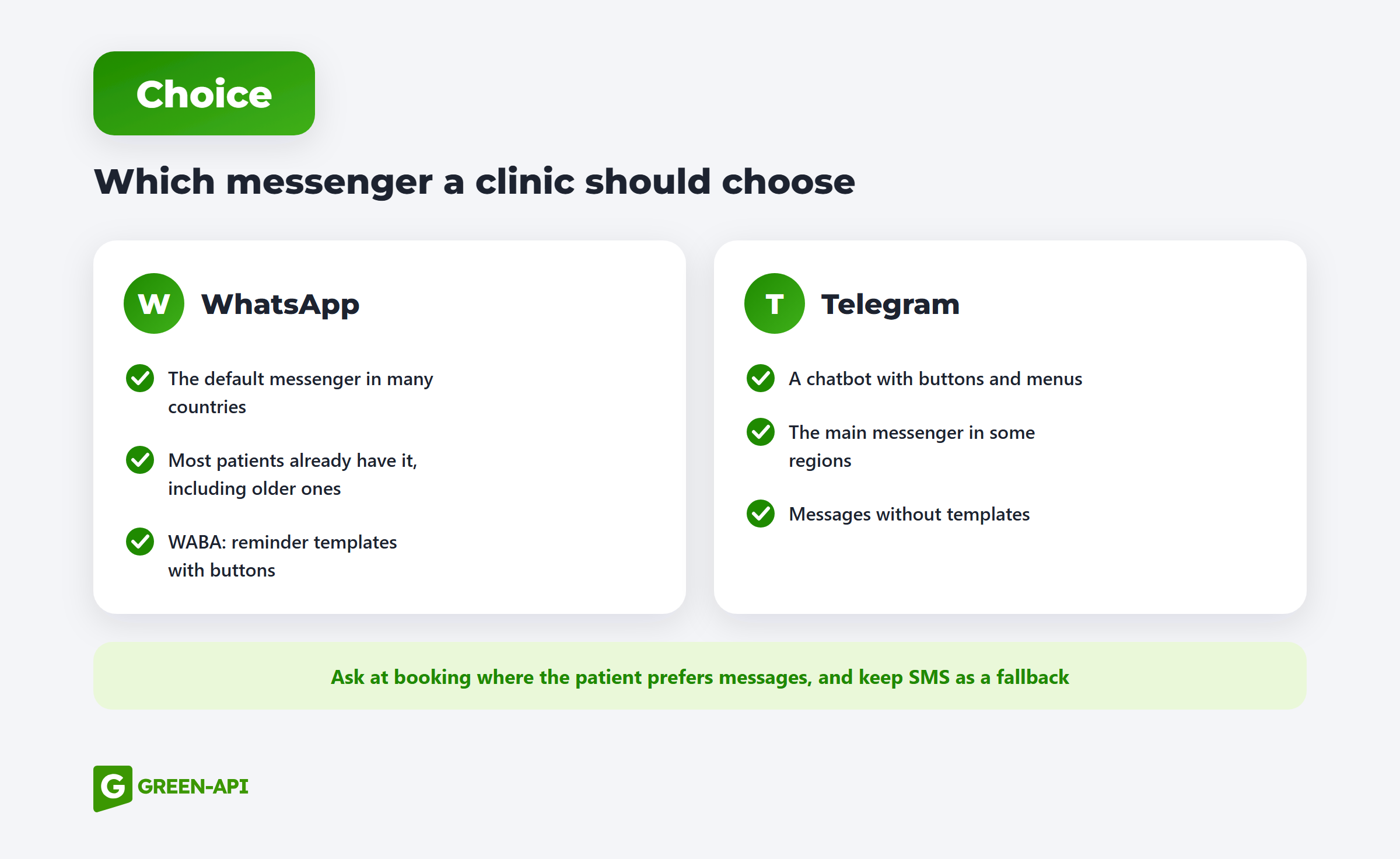
There’s no need to guess. Ask at booking where the patient prefers to get messages, and keep SMS as a fallback for those who use neither.
Metrics to track
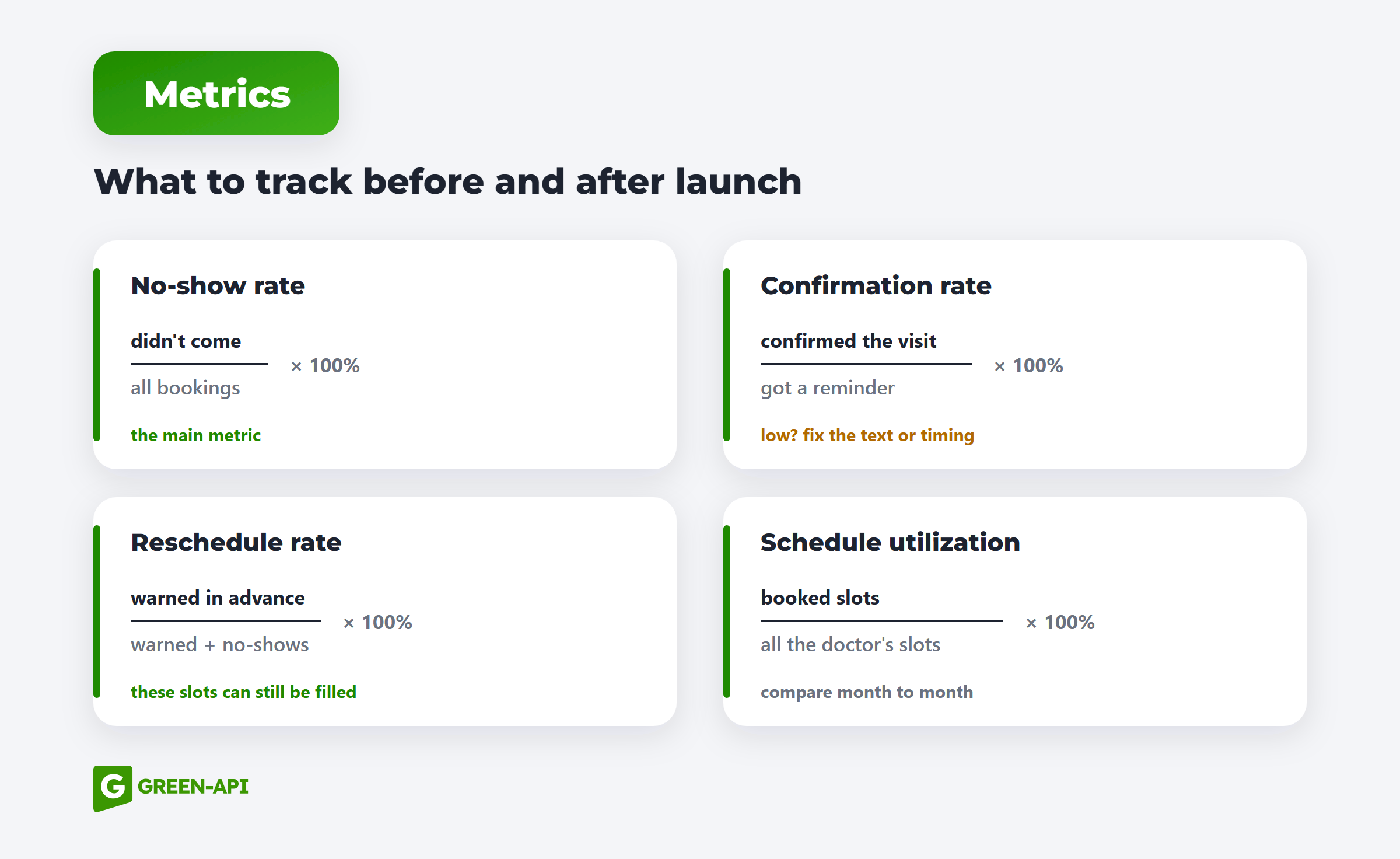
Compare equal periods before and after launch, such as month to month without holidays:
- no-show rate — the percentage of booked patients who didn’t come. This is the main metric;
- confirmation rate — the percentage of patients who got a reminder and confirmed the visit. If it’s low, the text is unclear or arrives at the wrong time;
- reschedule rate — how many patients warned you in advance that they couldn’t come instead of simply not showing up. The clinic can still give their slots to others;
- schedule utilization — the percentage of the doctor’s slots that are booked.
To calculate these metrics automatically, set up your practice management system or CRM to receive patient replies: through ready-made CRM integrations or the API.
How to connect messengers with GREEN-API
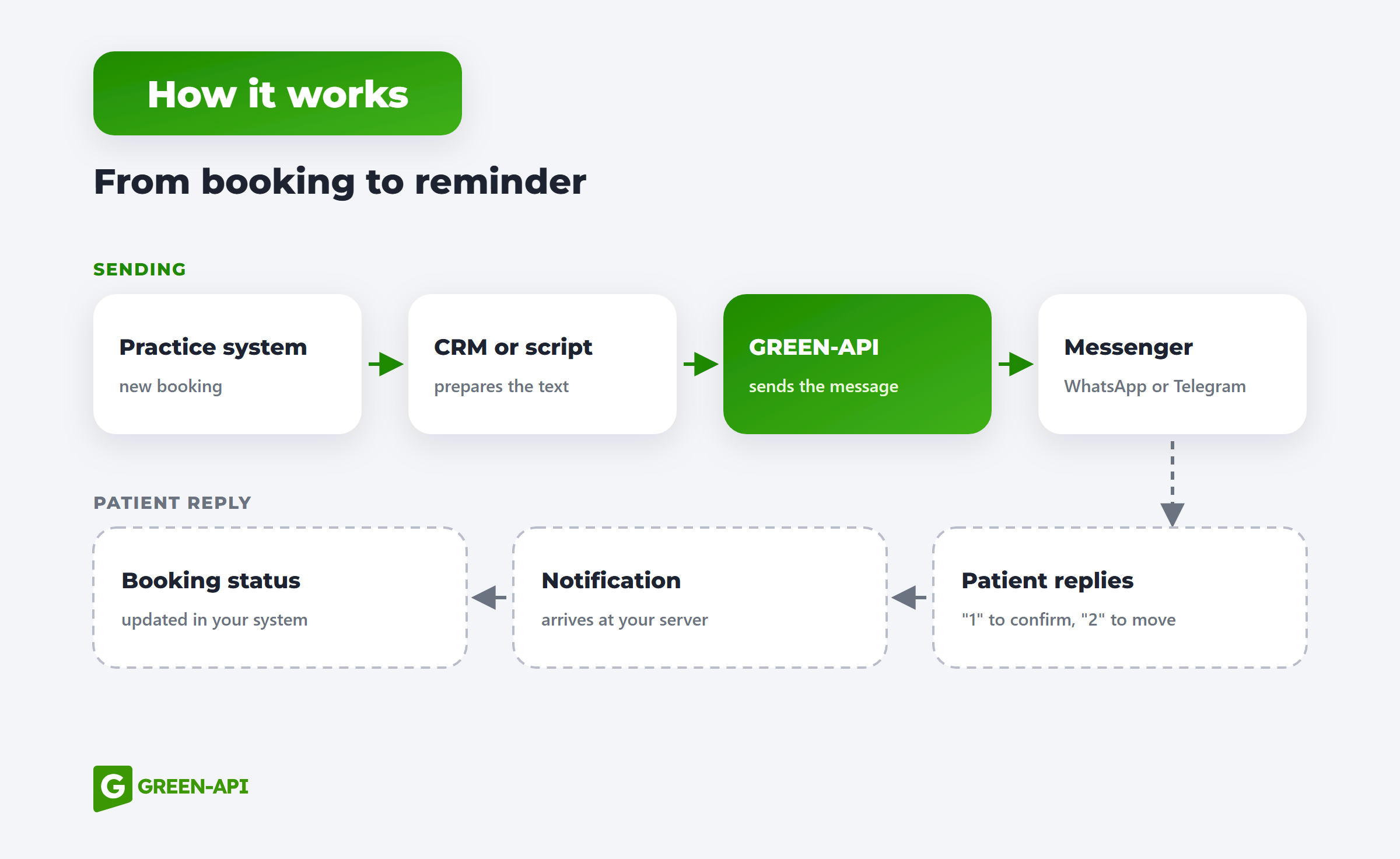
GREEN-API is an API for WhatsApp and Telegram. When a new booking appears, your practice management system sends an event to your CRM or script, and it sends the patient a message through GREEN-API. The patient’s reply comes back as a notification to your server, and the script updates the booking status.
- WhatsApp via QR code and Telegram — confirmations, reminders and chats without templates.
- WABA — the official WhatsApp Business API for template reminders with buttons.
- Integrations — with CRMs such as Bitrix24 and no-code tools like Make, n8n and Zapier.
Start with the free Developer plan: connect a test number and try the flow on yourself and your colleagues. Sign up at green-api.com.
FAQ
Can I send test results via WhatsApp?
Not without the patient’s explicit consent: test results are confidential medical information. Tell the patient the results are ready and link to the patient portal. If a patient asks to receive results in a messenger, check with your legal adviser what your local law requires.
How many hours before an appointment should I send a reminder?
24 hours and 2–3 hours before the visit. The first gives time to reschedule, the second keeps the visit from slipping the patient’s mind. For early appointments, send the second reminder the evening before, not at 6 am.
Do I need the patient’s consent to send messages?
Yes. Get a separate consent for messenger notifications and opt the patient out at the first request. Promotional messages usually require a separate consent under local marketing laws.
Is it legal for a clinic to use WhatsApp for patient reminders?
In most countries, yes, if you follow local laws on medical and personal data: get consent, keep diagnoses and results out of messages, and store data as the law requires. Some countries set stricter rules for health data, so check with a lawyer before launch.
Which is better for reminders — SMS or a messenger?
SMS reminders reduce no-shows — the studies above show that. A messenger adds more: the patient replies in the same chat, you can add buttons and a map link, and the front desk sees the whole conversation. Make a messenger your main channel and send SMS to patients who don’t use one. You can check in advance whether a number has WhatsApp through the API.
Connect WhatsApp and Telegram to your patient bookings on the free Developer plan