
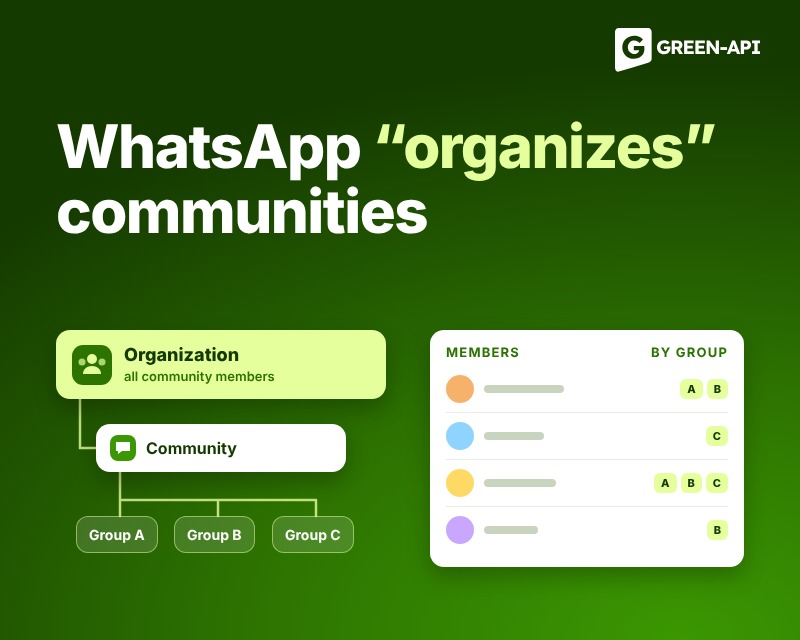
WhatsApp is testing a new feature called “Organizations,” designed to help community administrators manage their communities. This feature will provide administrators with a new screen where they can view all members of a specific community. For administrators of large communities, this feature will make it easy to organize members and subgroups.
Table of Contents
For context
Communities were introduced to the messaging app back in 2022. This feature lets administrators combine related groups into a single structure, making it easy for users to organize multiple groups on one topic in one place.
At the same time, along with the “Communities” feature, WhatsApp introduced an announcements group where administrators can share news with all community members at once, by interest. For example, schools, work teams, and any organizations that need to coordinate the work of multiple groups can create and manage communities and the announcements within them.
What Is It?
As communities grow, managing them becomes challenging, since administrators have to check each group individually to find out who is part of the community and which specific group they belong to. WhatsApp is currently developing a new feature that will make it easier for administrators to oversee their communities. The new feature is expected to be called “Organizations” and will provide administrators with additional tools to manage large communities more effectively.
How It Will Work
“Organizations” is a dedicated space where administrators can monitor their communities and their members. We expect it to display information such as the organization’s name and description, where administrators can view the total number of members and manage them. As soon as administrators tap “Show All,” they’ll be able to see a complete list of members and find out which subgroups they belong to.
How “Organizations” Differ from “Communities”
Users should not confuse organizations with communities, as these are two different features. A community is a structure that brings together related groups, where members can join subgroups and receive announcements from administrators. An organization, on the other hand, is a layer that sits above the community. It is a management tool for administrators, so members do not see it or interact with it. As a result, the “Organizations” feature will not change how members experience their community.
When Will It Be Available?
“Organizations” are currently in the early stages of development and are therefore not available. This means it is unknown when the new feature will go live.
Conclusion
At GREEN-API, we keep track of all WhatsApp updates to provide you with the latest news and solutions for automating your business processes. Stay tuned to stay up to date on all the latest developments!