
What is an unofficial WhatsApp API?
An unofficial WhatsApp API is a gateway made by a third-party developer. It connects to WhatsApp the same way WhatsApp Web does: your number is linked as one more device. The gateway turns this connection into a REST API that your software can use. Meta does not create, sell or support such gateways. They work with a normal WhatsApp or WhatsApp Business account.
«Unofficial» means «not made by Meta», not «hacked». The gateway does not change the WhatsApp app and does not use modified builds. It works through the same linked-device mechanism as WhatsApp Web on a computer.
Two terms you will need below:
- Linked device: any device other than your phone where your WhatsApp account is open. For example, a computer with WhatsApp Web. The gateway becomes such a device too.
- Instance: the connection of one WhatsApp number to the API. Each instance has its own ID and its own token for requests.
How does an unofficial gateway work?
Working with a gateway takes three steps.
- Create an instance. A new instance appears in the provider’s console, together with an ID and a token for requests.
- Link the number. Scan the QR code with the phone where WhatsApp is installed. After that, the number becomes a linked device of the gateway. Many providers also let you link the number with a code from the console instead of a QR code.
- Exchange messages over HTTP. Your software sends messages with HTTP requests. Incoming messages come to your server as webhooks: each event of the instance creates a separate notification. If you have no server for webhooks, you can fetch notifications from the API on request.
To check that the connection works, send a separate request to the API: the gateway returns the state of the instance, and a working instance is «authorized».
How is an unofficial gateway different from the official API?
Meta offers the official WhatsApp Business API through providers. It needs business verification, a separate number and approved message templates. An unofficial gateway needs only a phone with WhatsApp and a QR scan. Each path has its own price and its own rules.
| Criterion | Unofficial gateway | Official WhatsApp Business API |
| Setup | Create an instance and scan a QR code | Meta account, business verification, number registration |
| Number | A normal number with the WhatsApp app | A separate number for the API |
| Templates | Not needed | The first message to a customer must use an approved template |
| Payment | The provider’s plan | The provider’s plan plus Meta’s fee for each template message |
| Risk for the number | Higher: a normal account follows normal WhatsApp rules | Lower, if you follow Meta’s rules |
| Business profile | Normal profile | Verified business profile |
Conclusion: the official path fits companies with high volume and marketing campaigns. An unofficial gateway fits a quick start, notifications and chats with customers who write to you first.
How to connect the official API
You connect the official API through Meta directly or through a provider. You need a Meta Business account, a separate number and business verification. Messages that a business sends first go out only with templates that Meta approved. Since July 1, 2025, Meta charges for each delivered template message, and the price depends on the country and the template category: marketing, utility or authentication. The setup requirements are in Meta’s documentation for the WhatsApp Business Platform. GREEN-API also offers the official WhatsApp Business API as a separate product.
Is it legal and safe to use a gateway?
The WhatsApp messaging guidelines list unofficial clients among violations when they harm the service or its users.
In practice, this means WhatsApp can block a number for spam, customer complaints, or a sharp rise in messages. No provider can guarantee that this will not happen. Five rules help lower the risk:
- Write only to people who agreed to receive messages. Messages to people who did not expect them are the main cause of complaints and blocks.
- Give a simple way to unsubscribe. For example, ask the customer to reply «STOP» if they no longer want messages, and remove them from your list at once.
- Warm up a new number. Start with a small number of messages to people who reply, and grow the volume step by step. More details are in how to warm up a new WhatsApp number.
- Pause between messages. Do not send your whole list in one minute. Aim for the pace of a live operator.
- Write to the point. An order status or an appointment reminder gets fewer complaints than an ad.
What can you get for free?
Free options come in two kinds. Open-source projects are free to download, but you pay for the server, updates and developer time. Free provider plans cost nothing per month, but they limit the number of chats, messages or number checks. On the official API, Meta charges for template messages, so there is no fully free setup for a business with high volume.
Open-source projects on GitHub
- whatsapp-web.js: a Node.js library that controls WhatsApp Web through a browser.
- Baileys: a Node.js library that connects to WhatsApp without a browser.
- WAHA Core: a ready HTTP API in a Docker container. The core version is free, and the extended version requires a subscription.
The code itself is free, but the server, updates after WhatsApp changes and support are on you. The WAHA authors themselves warn that WhatsApp does not allow bots or unofficial clients, so this approach cannot be called fully safe.
Free provider plans
Cloud providers usually offer a free plan or a free trial. For example, GREEN-API has a free Developer plan: $0 per month, one instance, chats with three contacts, 100 number checks and 10 statuses per month. Paid plans: Business costs $12 per month per instance, Chatbot costs $24 per month, and Partner costs $0.40 per day per instance.
Prices and limits are accurate as of October 2026.
How to choose a provider
Compare providers on six points: how the number is linked, which methods exist, the maximum file size, how webhooks work, whether they have a public status page, and the cost at your volume.
| Solution | Where it runs | Free option | Best for |
| Open-source libraries (whatsapp-web.js, Baileys) | Your server | Yes, fully | Developers ready to maintain the server themselves |
| WAHA | Your server | Yes, Core version | Teams that need a ready HTTP API on their own server |
| Maytapi | Cloud | Free trial | Teams that need a cloud gateway without their own server |
| GREEN-API | Cloud | Yes, Developer plan | Teams that want to test the integration for free and not maintain a server |
Actual as of October 2026. Check the providers’ websites before you choose.
Your own server or the cloud
Solutions on your own server are cheaper and more flexible, but you handle the server, updates and recovery after failures. Cloud gateways cost more per month, but the provider does this work for you. Look for a public status page: it shows how often the service has outages. For example, GREEN-API has a public status page.
How to send your first message through GREEN-API
- Create an instance. Sign up in the GREEN-API console and create an instance on the free Developer plan.
- Link the number. Click Get QR and scan the code with the phone where WhatsApp is installed.
- Copy the values. For requests, you need three values from the instance card: apiUrl, idInstance and apiTokenInstance.
- Send a message. This is one POST request with the recipient’s number and the text. In GREEN-API, you use the SendMessage method.
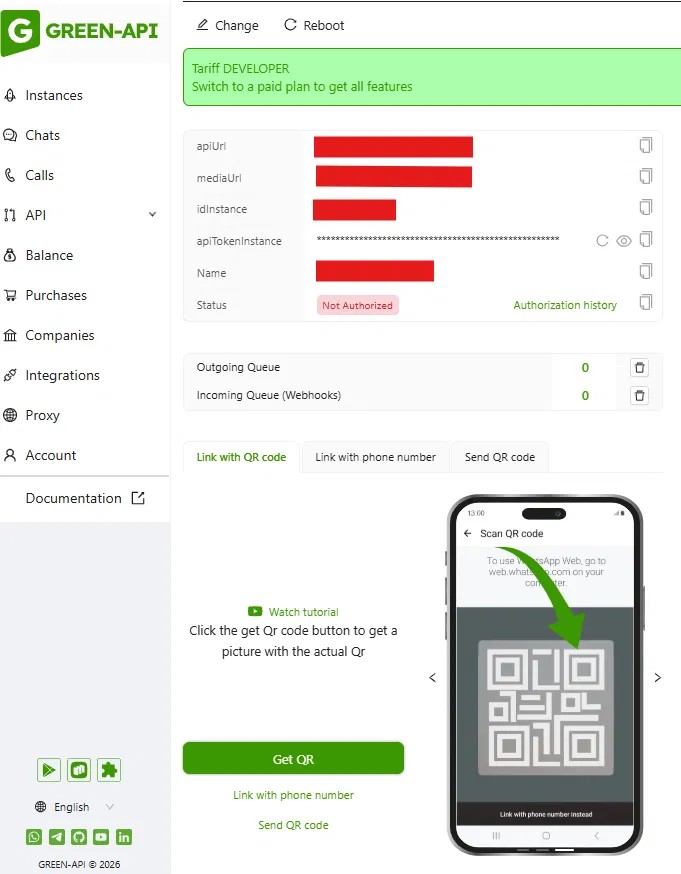
Console screenshot, October 2026.
Request example:
curl --location '{{apiUrl}}/waInstance{{idInstance}}/sendMessage/{{apiTokenInstance}}' \

--header 'Content-Type: application/json' \

--data '{

"chatId": "12025550123@c.us",

"message": "Hello! Your order #1042 is ready for pickup."

}'
The chatId is the recipient’s number in international format with @c.us at the end, with no plus sign. The response contains idMessage, the ID of the sent message. The delivery status comes later as a separate webhook.
Send a message with Python
The same request in Python with the requests library:
import os

import requests
api_url = os.environ[«GREEN_API_URL»]
id_instance = os.environ[«GREEN_API_ID_INSTANCE»]
api_token = os.environ[«GREEN_API_TOKEN»]
url = f»{api_url}/waInstance{id_instance}/sendMessage/{api_token}»
payload = {
«chatId»: «12025550123@c.us»,
«message»: «Hello! Your order #1042 is ready for pickup.»,
}
response = requests.post(url, json=payload)
print(response.json())
Keep the instance ID and token in environment variables, not in the code. GREEN-API has ready libraries for Python, Node.js, PHP, Java, Go and other languages.
Create a free Developer instance and send your first message today. Sign up in the GREEN-API console. The plan details are on the page about the free Developer plan and its limits.
How to send 10,000 messages on WhatsApp
You can send large volumes through an API, but not all at once. A new number that sends thousands of messages on its first day gets blocked quickly.
- Check your list. Keep only people who agreed to receive messages, and remove numbers without a WhatsApp account. In GREEN-API, the CheckWhatsapp method checks numbers.
- Warm up the number. For the first few days, send a few messages and only to people who reply.
- Split the list. Send messages in batches over several days, not to the whole list at once.
- Set a pause between messages. In GREEN-API, the sending interval is set in the instance settings, and messages wait in a queue on the service side.
- Watch the queue. The GetMessagesCount and ShowMessagesQueue methods show how many messages are waiting, and ClearMessagesQueue clears the queue if you need to stop a campaign.
The WhatsApp Business rules let you write to a customer only after they gave you their number and agreed to receive messages. Every campaign needs a simple way to unsubscribe.
What businesses do with a gateway
Businesses most often use a gateway for four tasks. Each one needs only two things: a method to send a message and a webhook that receives the customer’s reply.
- Notifications instead of SMS. Order status, delivery, appointment or payment reminders.
- A bot answers common questions and passes complex requests to a manager.
- Chats in a CRM. Managers see WhatsApp chats in the customer card and reply from there.
- A WhatsApp button on a website. A customer writes from the site, and the message goes to an operator or a bot.
For many tasks, you do not need to write code: GREEN-API has ready integrations with Make, Zapier and n8n, as well as with popular CRMs.
Chat on a website
A website usually has a button or a form that opens a chat with the company. When a customer writes, the gateway sends a webhook to your server, and a bot or an operator replies through the API. For example, an online store can confirm an order in WhatsApp right after checkout on the site.
What limits to plan for
An unofficial gateway works within the features of a normal WhatsApp account. Here are the GREEN-API limits to plan for in advance:
- File size: up to 100 MB for the SendFileByUrl and SendFileByUpload methods.
- Speed: messages go out through a queue, with an interval set in the instance settings.
- Message history: the LastIncomingMessages and LastOutgoingMessages methods return messages for the last 24 hours by default, and no more than 10,000 messages.
- Number checks: the CheckWhatsapp method gives 100 checks per month on the Developer plan and 30,000 on the Business plan.
- WhatsApp Status statistics: the GetStatusStatistic method keeps data for 30 days.
What you will not get at all: message templates, a verified business profile and Meta ad reports with a click-to-chat button. These are features of the official WhatsApp Business API.
Limits are accurate as of October 2026.
What to do if the gateway stops working
In most cases, the cause is one of three.
- The number was unlinked from the gateway. This happens if the linked device was removed from the phone or WhatsApp was offline for a long time. Check the instance state with the GetStateInstance method. If it is not authorized, scan the QR code again.
- The instance froze. The state is fine, but messages do not go out. Restart the instance with the Reboot method. If that does not help, log out with the Logout method and link the number again.
- Your server does not accept webhooks. Then incoming notifications pile up in the queue. The GetWebhooksCount method shows how many there are, and ClearWebhooksQueue clears the queue. Then check your server logs.
If the problem is on the service side, you will see it on our public status page.
Frequently asked questions
Does WhatsApp have an API?
Yes. WhatsApp has the official Business API from Meta, and there are also third-party gateways that connect a normal account as a linked device. The official path needs business verification and approved templates. A gateway needs a phone number and a QR scan. Both ways let you send and receive messages from your software. Choose by volume, budget and the level of risk for your number that you can accept.
Is the WhatsApp API free for personal use?
Some gateways have a free plan for tests. It usually limits the number of chats and messages, so it fits testing an idea, not real traffic. For example, the GREEN-API Developer plan allows chats with three contacts. Open-source projects are free to install, but you pay for the server. The official Business API is made for companies, not for personal chats, and Meta charges for each template message.
Does WhatsApp have an open API?
No. WhatsApp does not publish an open API that anyone can use. For businesses, Meta offers the WhatsApp Business Platform. Third-party gateways build their REST API on the same connection that WhatsApp Web uses. That is why they are called unofficial: Meta does not create, sell or support them.
How do I get a WhatsApp API key?
For an unofficial gateway, the pair «instance ID and token» works as the key. In GREEN-API, these are idInstance and apiTokenInstance: they appear in the instance card in the console right after you create it. For the official API, the key is an app access token that Meta issues in its developer dashboard after you connect the WhatsApp Business Platform. Keep the key in environment variables and do not publish it in your code.
How do I use the WhatsApp API with Python?
Install the provider’s library or use the requests package. Save the instance ID and token in environment variables. Then call the send method with the recipient’s number and the text: there is an example in the section about the first message. GREEN-API has ready libraries for Python, Node.js, PHP, Java, Go and other languages. Start with one message to your own number.
What is the difference between WhatsApp Business and the WhatsApp Business API?
WhatsApp Business is a free mobile app for a small team. It has a catalog, quick replies and labels, but no automation from your systems. The WhatsApp Business API has no app: it is an interface for software, through which a CRM or a bot sends and receives messages. The app fits a shop with one phone, and the API fits a company with many chats.