
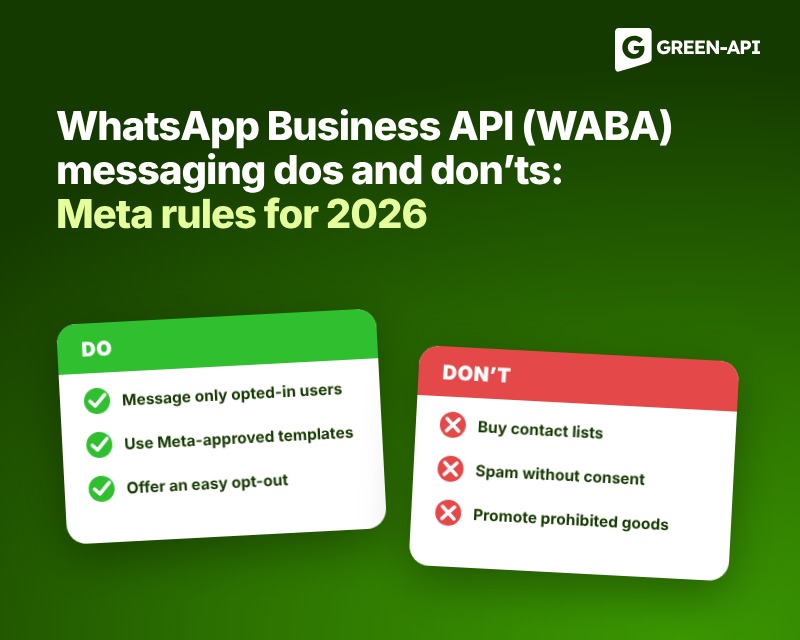
WhatsApp Business API messaging has long been seen as a notification tool, for example, to confirm an order, notify about a delivery, or remind about an appointment, and any promotions or discounts were considered practically taboo. However, over the past two years, Meta has repeatedly revised its rules, and today, marketing emails in WABA are completely official, although they depend on tariffs, limits and template requirements.
In this article, we’ll examine Meta’s current messaging requirements as of November 2026, drawing exclusively from official sources — the WhatsApp Business Policy, developer documentation, and pricing pages. We’ll explain what can be sent, what is prohibited, how to obtain consent from clients properly, what limits apply, and how to structure your messaging so your number works reliably.
Table of Contents
How WABA newsletters work: templates and categories
WABA’s main rule is that you can’t initiate a free-form message with a client. Any message sent by the company on its own initiative must be sent using a template approved by Meta, which reserves the right to review, suspend, and reject such messages. The only exception is responding to a client’s message; after that, a 24-hour service window opens during which the company can communicate without templates. When the window closes, only approved templates are used again.
All templates are divided into three categories; the choice of category determines not only the rules of use, but also the cost of messages.
Marketing
Marketing includes anything that promotes, recommends, or attracts a customer, such as promotions, discounts, coupons, new product announcements, shopping cart reminders, app install invitations, and even birthday greetings. Meta also classifies templates with mixed content as marketing, such as order notifications with a discount, as well as templates with unclear text, such as the variable {{1}} or the word “Congratulations!” It’s worth noting that a subscription expiration reminder with a call to renew, even though the customer requested such a reminder, is also considered marketing. All marketing messages are paid.
Transactional (Utility)
Transactional templates are related to a customer action or request, such as order confirmation, delivery status, appointment reminder, or payment notification. To qualify for this category, a template must not contain any advertising or any hint of persuasion. The message must either relate to a specific order, account, or service, or notify of something truly important, such as a storm warning, service outage, or product recall.
Authentication
Authentication templates are designed only for one-time verification codes, and sending such codes through other categories is not allowed. The requirements here are the strictest: the template must be taken from the Meta library, it requires a copy code or autofill button, and links, images, and emojis are prohibited, as are variables longer than 15 characters. The categories are described in detail in the official template categorization rules.
Please also note that Meta has the final say in category selection. If you selected ” Transactional ” and Meta deems the template content marketing-related, the template will be immediately approved as marketing-related, and existing templates may be automatically reclassified.
What can you do at WABA?
Despite the abundance of rules, WABA has enough possibilities and Meta allows the following scenarios.
Marketing newsletters
Promotions, personalized offers, announcements, and greetings are permitted if they are sent through a “Marketing” category template and the recipient has given prior consent. The newsletter doesn’t have to be sales-oriented: Meta classifies information about a new branch, thank-you notes to loyal customers, and other messages that strengthen brand ties as marketing. Therefore, company news can be sent, but it should be designed as a marketing message.
Messages about orders and services
Payment confirmation, tracking number, delivery status update, appointment reminder, invoice, document readiness notification —all of these are included in the ” Transactional ” template. A request for feedback is also appropriate here, but only for a specific order or request. A general survey like “How do you like our service?” is not considered a service survey and should be sent as a marketing one.
Confirmation codes
One-time passwords and login codes via WhatsApp have become a convenient replacement for SMS. They come with dedicated authentication templates.
Dialogue with the client within 24 hours
If a human contacted the customer first, the company can respond with free text, send files, and engage in a casual conversation without formulas. A chatbot can handle routine questions, but the customer should always have a quick and clear path to a live person: transfer to a live chat operator, phone, email, website support page, contact form, or office visit.
AI assistants for your business
As of January 15, 2026, Meta will no longer allow companies that use artificial intelligence as their core product, such as universal assistants that answer any questions, to join WABA. A language-model-based bot that helps your customers with orders, bookings, and customer support remains permitted: the terms and conditions explicitly allow businesses to outsource their AI services to an AI provider.
Click to WhatsApp advertising
If someone messages you from an ad with a WhatsApp link or from a button on a Facebook page*, and you respond within 24 hours, a free 72-hour window opens. Any messages within this window, including templates, are free.
Customer consent: the foundation of any newsletter
Meta only allows messages from people who have provided their phone number or username and confirmed that they want to receive messages from your company. Starting in November 2024, consent can be general and not limited to WhatsApp, so consent collected on a website, in a form, over the phone, or in-store will also work, as long as it complies with the law.
The consent form must clearly state that the person agrees to receive messages and identify the company from which they will come. You choose the collection method yourself and are responsible for ensuring it complies with your country’s advertising and personal data laws. We covered more details on obtaining consent correctly in a separate article, and Meta’s requirements are summarized on its official page.
Meta recommends not limiting yourself to the bare minimum. Ask permission separately for specific message types, such as order notifications and promotions, and for calls. Explain the benefit to the recipient, and show how to unsubscribe. Respect any refusal, whether on WhatsApp or elsewhere, and immediately remove the number from your mailing list. Additionally, customers can opt out of receiving marketing messages from your company directly in WhatsApp.
At the same time, Meta also evaluates the consent forms themselves based on user reactions, so if there are a large number of complaints, it may impose restrictions.
What is prohibited in WABA mailings
Messages without consent and without a template
You must not initiate a conversation without an approved template, message people who have not consented to receive messages, or continue sending messages after they have declined. You must also not confuse, deceive, or surprise recipients, impersonate another company, or speak on someone else’s behalf without permission. Your business profile must include up-to-date support contacts: email, website, or phone number.
Advertising disguised as transactional messages
Hiding a promotion in the ” Transactional ” template won’t work: Meta will approve such a template as marketing and charge it at the marketing rate. If a company is warned of abuse, categories are changed instantly, without the 24-hour notice required, as was previously the case.
Sensitive data
Requesting or sending full bank card numbers, account numbers, ID numbers, and other sensitive identifiers is prohibited. Sharing chat information from one client to another is prohibited, and WhatsApp data about a person is only permitted for use in communicating with them. A separate restriction applies to health: if the law prohibits the transfer of medical information to systems without enhanced security requirements, WhatsApp cannot be used for this purpose.
Prohibited goods and services
Meta prohibits businesses from entering WABA that sell or promote weapons, alcohol and tobacco, narcotics (including prescription drugs), medical devices and health products, rare and endangered species of animals and plants, animals other than livestock, hazardous substances, real, virtual, and counterfeit currencies, including ICOs and binary options, body parts and bodily fluids, gambling, adult products, dating services, network marketing, payday loans, peer-to-peer lending, and debt collection. This ban applies regardless of the licenses and permits the company holds in its home country.
These prohibitions are interpreted quite broadly. Examples of violations listed in Meta documentation include alcohol accessories, e-cigarettes and hookahs, pet products and veterinary services, digital content, subscriptions and accounts (including links to their sale, renewal, and price increases), as well as counterfeit goods and pirated copies of films, music, games, and books. Misleading offers include weight loss products that instill a negative self-image in people.
Organizations that are not eligible for WABA
The platform may not be used by organizations associated with terrorism and organized crime, political parties, politicians, candidates and election campaigns, as well as law enforcement agencies and Paramilitary intelligence agencies. Government agencies are allowed only through a solution provider, and organizations that primarily publish news must be registered on Facebook as a “News Page.” Furthermore, posts must not contain offensive content, such as explicit material or nudity, and must not express preference or dislike for people based on race, nationality, religion, age, gender, or other characteristics.
Limits and spam protection
Account limit
Meta limits the number of unique recipients you can deliver messages to outside of your service window in a rolling 24-hour period. A new business portfolio starts with 250 recipients, and this limit is applied to the entire portfolio and applies to all numbers in it, so one active number can deplete the remaining numbers. You can increase the limit to 2,000 by verifying your company information or by sending 2,000 delivered messages to unique recipients over 30 days using high-quality templates. The limit then increases automatically: if you send high-quality messages and have used at least half of the current limit in the last 7 days, Meta increases it by one level within 6 hours. For more details, see the limits documentation.
Marketing limit per person
Separate from the account limit, there’s a limit on the number of marketing templates a single user can receive from all companies at once. Meta doesn’t specify a specific number; the limit is adjusted based on how a user reads marketing messages and how many other messages they have in their chats. When a client replies to your message, a service window opens, and marketing within it doesn’t count toward the limit. Full rules are available on the marketing template limits page.
Template quality
Meta assigns a quality rating to each template based on complaints, blocks, and customer responses. If a template receives the lowest rating, it is automatically suspended: for 3 hours the first time, 6 hours the second time, and permanently disabled the third time. Sending attempts using a suspended template are not charged or counted toward the limit. However, the API will reject such a request, so sending messages based on this template should be stopped. If a company consistently sends low-quality templates, this may ultimately impact the number itself. If blocks and complaints are frequent, Meta* reserves the right to limit the number of messages a business can send. More information is available on the template suspension page.
Tariffs: What’s changed since October 1, 2026?
Starting July 1, 2025, Meta will charge per delivered message, not per 24-hour conversation. The rate depends on the template category and the recipient country, which is determined by the number code. Volume discounts apply for transactional and authenticated messages. Meta can only change rates on the first day of a quarter, which is January 1, April 1, July 1, or October 1. You will be charged according to the category assigned to the template at the time of sending, so any category error will be immediately reflected on your bill. Current rates are published on the rates page.
Effective October 1, 2026, the rules changed again. Meta began charging for service messages, meaning regular responses to customers within a 24-hour window. The first 1,000 such messages per month per number remain free, and starting with the 1,001st, the rate matches the rate for service templates in the recipient country and does not include volume discounts. Furthermore, transactional messages sent within the open window became chargeable again, although they were free from July 2025 to September 2026. Incoming customer messages and all messages within the 72-hour window after clicking on an ad remain free. We published a detailed analysis of these changes in the article “WhatsApp Changes Rates for Companies and Businesses“.
Recommendations for safe mailings
Store consent confirmations
Record when, where, and in what words the person consented to messages. Meta holds businesses responsible for obtaining consent, and such records will be helpful if a dispute arises.
Don’t disguise advertising
Don’t mix order information and advertising in the same template: each template should serve only one purpose. If you’re unsure about the category, it’s more honest to send the message as a marketing one, as it’s more expensive but won’t incur any penalties for substituting a category.
Write what the client expects
The message should be clear, to the point, and arrive when it’s truly expected. Name the company, explain why you’re writing, and always provide an unsubscribe option. The higher the percentage of messages read and the fewer complaints, the better the quality of the number and templates.
Divide your audience and maintain pauses
Send offers to those who are interested and don’t repeat the same thing to everyone. Segmentation reduces complaints and helps you avoid reaching your marketing limit per customer. We discussed how to divide customers into groups in our article on segmentation.
Increase volume gradually
Start with your most active customers and gradually expand your mailing list. The limit only increases when you’re sending high-quality messages and using a significant portion of your current inventory. New templates also undergo customer feedback testing, so there’s no point in rushing.
Monitor your account status
Subscribe to webhooks message_template_status_update, account_update, and user_preferences, and regularly check Business Support Home. If a template is paused, stop sending emails based on it instead of attempting to send them further. Check the Meta* category assigned to templates and don’t ignore emails to account administrators: this is where notifications about violations and category changes are sent.
Don’t leave the client alone with the bot
If the conversation involves a bot, provide a transfer to an operator, phone, email, or support form. Also remember that compliance with advertising, consent, and personal data laws remains the responsibility of the company, not Meta.
Check with primary sources
Meta reserves the right to change this policy without notice, and the latest version of the WhatsApp Business Policy is dated September 23, 2026. Therefore, before launching a large campaign, it is worth reviewing the WhatsApp Business Policy, WhatsApp Messaging Guidelines, and the developer documentation.
What to do if WABA restrictions are hindering your business
You can connect to the official WABA account via the GREEN-API. You’ll need a dedicated phone number, a personal Facebook account, a business portfolio with your organization’s name, and a short company description. Our team will then handle the connection. On weekdays, it takes about two hours. We covered the step-by-step instructions in our article about WABA, and discussed how the rules of the game have changed for businesses in the WABA webinar summary.
If WABA doesn’t suit your business’s theme or format, there’s an unofficial WhatsApp channel from GREEN-API. It offers more flexibility in managing your newsletter content and is suitable for automating communications, integrating with CRM and ERP, sending texts, images, videos, documents, and much more. Please note that an unofficial channel carries a higher risk of having your number blocked, so we ask that you follow our newsletter recommendations, which we outline in a separate article.
Conclusion
In summary, WABA’s newsletters have long since ceased to be limited to order notifications: marketing, service messages, and confirmation codes all work hand in hand, and each type has its own template, price, and rules. All Meta requirements are united by one idea: respect for the person who is waiting for your message, understanding who it’s from, and always having the option to unsubscribe or opt out.
The rules are constantly changing, so we at GREEN-API are closely monitoring Meta updates and will be sure to inform you about any significant changes.