
What is it?
In a previous article, we discussed how Meta AI was introduced in the desktop version of the app, where it answers questions and generates images without leaving the chat. The Business Assistant works on a similar principle but is tailored for different purposes, primarily to help entrepreneurs with tasks such as marketing or sales. In this article, we’ll explore what it looks like, what it can do and how it differs from Meta Business Agent.
Where to find it
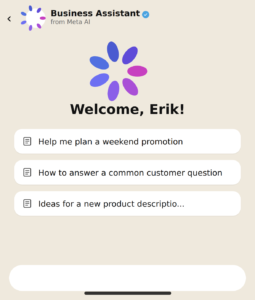
The Business Assistant icon is located in the lower-right corner of WhatsApp Business. When you open it, it greets the account owner. It offers several pre-made cards to start a conversation, such as “Help me plan a weekend promotion,” “How to answer a common customer question” or “Ideas for describing a new product description.” Just tap the appropriate card and there’s no need to make the question yourself.
What it can do
The assistant takes on some of the tasks so the business owner can focus on their core work. It writes product descriptions, crafts ad copy, and creates images for the catalog, offering suggestions on how to improve the business profile in WhatsApp Business and sharing marketing tips, from launching a new product to planning promotional campaigns.
At Meta, this version of the business assistant is considered more advanced than the standard WhatsApp version, as it is tailored to attract and retain customers; therefore, the suggestions often include ready-made ideas for personalizing communication with customers and offering them suitable products.
Business Assistant and Meta Business Agent: who’s who
It’s easy to confuse the Business Assistant with another Meta product, Business Agent, which the company launched globally in June 2026. Business Agent responds to customers on behalf of the business owner, as it handles correspondence, recommends products from the catalog, schedules appointments, and filters out irrelevant inquiries by connecting to external services, such as CRM systems. In other words, it handles full-scale sales automation and customer support.
The Business Assistant works differently: it communicates with the entrepreneur directly and builds a dialogue around their requests, rather than replacing them in chats with customers. For example, it can offer advice on how to structure an advertising campaign, suggest a business idea or calculate employee retention costs.
Yes, Meta’s names are similar, which is why users and customers occasionally confuse these two different tools.
New pricing plans from Meta
Since we’re on the topic of Meta’s AI assistants, we thought it would be appropriate to mention the company’s new pricing plans for incoming messages, which we covered in one of our previous articles. This will be followed by a price increase for WhatsApp, so we recommend calculating the cost of the messaging service in advance.
You can also check out our chatbot library, where we’ve compiled working WhatsApp AI integrations using GREEN-API methods.
Conclusion
Essentially, the business assistant is the same Meta AI that WhatsApp users are already familiar with, but with a ready-made set of scenarios and prompts for business tasks. The technology isn’t new, but the user experience is convenient: you don’t need to compose a request by simply tapping on a pre-made card or create your own request to get advice. Given how actively Meta is developing corporate AI tools, the business assistant will likely gain new features soon.
Here at GREEN-API, we’re keeping an eye on the latest developments and will keep you updated on all significant new features. We’re also constantly working on integrating new features into our service to make your work more convenient. Follow our blog to stay informed about new and useful features on WhatsApp!