
For context
Given the importance of these apps in our lives, it makes sense that no one is in a hurry to give them up. WhatsApp, for example, is deeply integrated into companies’ business processes, and Telegram has long since evolved from a messaging app into a full-fledged media tool with channels, bots, and work chats where hundreds of companies tackle tasks every day. Millions of users cannot imagine life without these apps, so it’s easy to imagine the difficulties people might face without stable access to them.
How the connection works
To understand what we’re talking about, just picture the usual path your message takes from your smartphone to the WhatsApp or Telegram servers. With a standard connection, everything happens directly: your device communicates with the messenger’s server, receiving and sending data. When this route is unavailable or unstable for any reason, the connection either fails to establish or experiences noticeable delays.
With an alternative connection, the route changes—traffic is first directed to an intermediate proxy server, and from there it is forwarded to WhatsApp or Telegram. The app works as usual, but the path to it is slightly different. End-to-end encryption is fully preserved, and the intermediary server has no access to your data or personal information. It only records the fact that traffic is being exchanged.
Settings for WhatsApp
iOS
To connect the server in WhatsApp for iOS, go to your device’s settings, as shown in the screenshots and enter the following parameters:
Server address: wa.kz.greenapi.org
Chat port: 8443
Media port: 7777
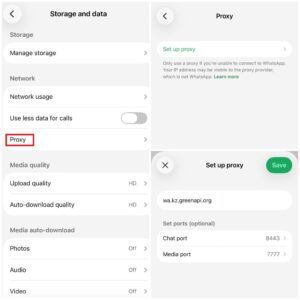
After entering the chat port, be sure to enable the TLS toggle to ensure encryption between your device and the server. Once saved, WhatsApp will display the connection status next to the address right in this section.
Android
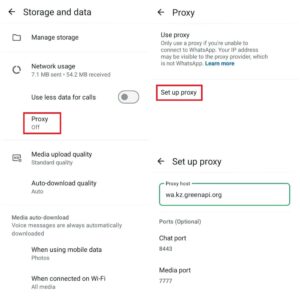
To connect to the server in WhatsApp for Android, go to your device’s settings as shown in the screenshots and enter the same settings as for iOS.
Settings for Telegram
Telegram supports two types of connections via a proxy server. The first is MTProto, developed specifically by the Telegram team and exclusively for Telegram; it is no different from standard HTTPS/TLS protocols and is best suited for resolving issues with unstable connectivity. The second is SOCKS5, a universal protocol used in a wide variety of applications, including corporate networks.
For the messenger to work properly under unstable network conditions, we recommend setting up MTProto.
iOS
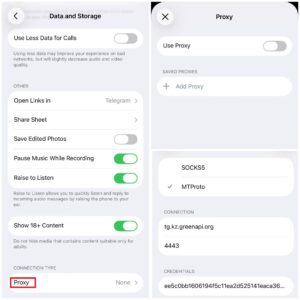
To restore your connection to Telegram on iOS, go to your device’s settings as shown in the screenshot and enter the following parameters:
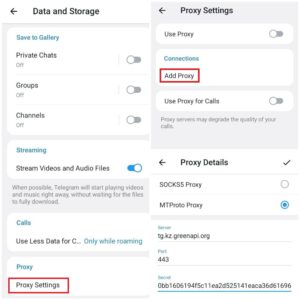
Server: tg.kz.greenapi.org
Port: 4443
Key: ee5c0bb1606194f5c11ea2d525141eaca36d61696c2e7275
Android
To set up a server in WhatsApp for Android, go to the relevant section on your device, as shown in the screenshots, and enter the same settings as for the iOS version.
Conclusion
If your business relies on WhatsApp or Telegram for communication, having an alternative connection can come in handy, especially if part of your team or your clients are in regions where messenger services are unstable.
GREEN-API provides a flexible API for messaging and process automation on WhatsApp and Telegram. Our technical support and sales teams will be happy to share all the necessary information and offer the best solution for your needs.
GREEN-API – your guide to the world of technology and communication!