
Selecting Chatbot tasks
Design is an important part of the chatbot creation process. Before you start writing the code, you need to formulate the tasks, develop the logic of the chatbot and choose a programming language.
Any popular general-purpose programming language is enough to create a simple chatbot. The choice of programming language is based on the requirements of your project:
- Cross-platform
- Code writing speed
- Multithreading
- Programming language performance
- Desire to learn the programming language better
Let’s imagine that you need to develop a chatbot for a service center support. After setting the main task, you can start designing the program’s algorithm. For clarity, we will use a flowchart:
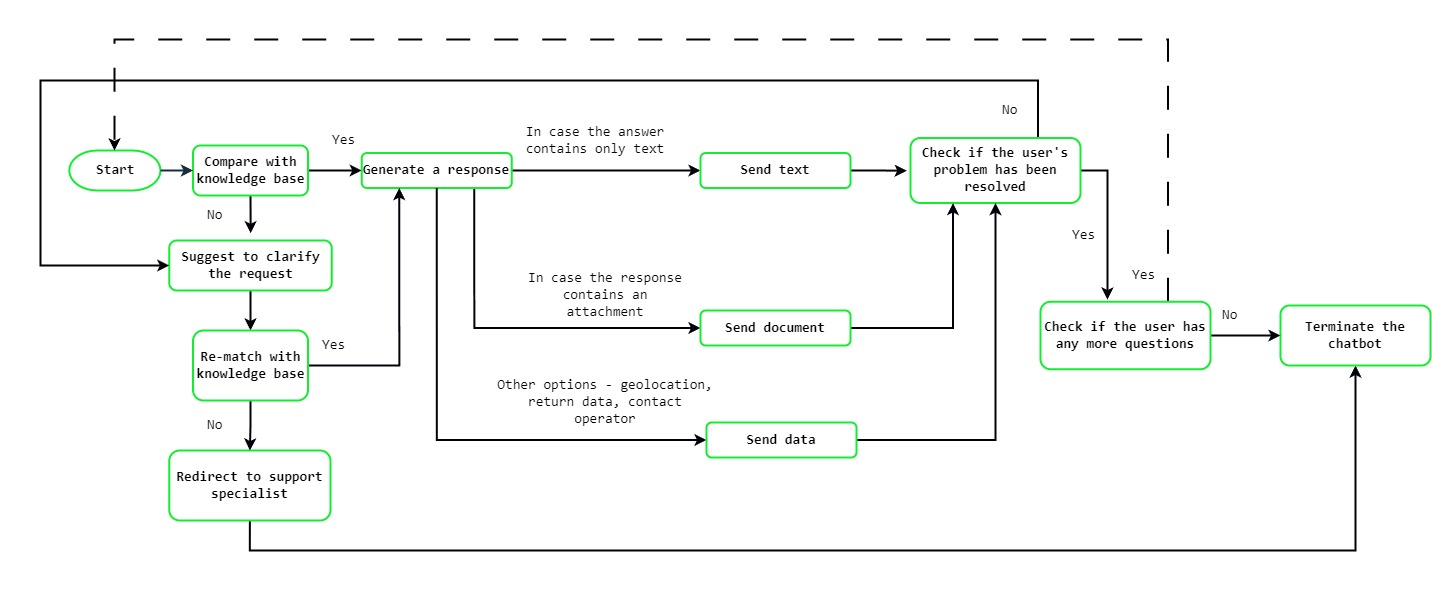
Having defined the main requirements of the chatbot and drawn up a scheme of the chatbot’s operation, you can proceed to the next step – choosing a programming language and designing functions.
Designing functions
The standard scenario for a chatbot is to communicate with the client, process simple requests, and in case of failure, switch the client to a service center support specialist. Some tasks are solved by built-in programming language tools, and some – using methods for sending and receiving messages, files, working with group chats, getting a list of contacts and other GREEN-API methods.
For the chatbot to work, it must be connected to a WhatsApp account. To do this, you need to create an instance and authorize it with the selected phone number, you can do this by following our instructions. To develop and test a chatbot, a free plan for developers is enough, and for commercial use we have a paid plan without restrictions.
To log in and transfer data from your console, you will need the following data from your instance: apiUrl, idInstance and apiTokenInstance.
After authorization, you need to write a function to handle messages that will come through incoming notifications of the webhook type. When receiving the first message from a new user, the handler checks the data about the user who sent the message, and then saves the sender to its database. This way, responses will be sent to a specific user, and all correspondence can be stored for processing by specialists.
After receiving a message from a user, the bot sends a request, usually a language selection or frequently asked questions. We also recommend using the function to delete a user from the database with a bot after a specified time to free up resources for other users.
Launching a demo chatbot on Golang
To demonstrate the capabilities, we will launch a demo chatbot on Go. The program demonstrates the possibilities of Green-API service for sending text messages, files, pictures, locations, and contacts. To test the bot, you will need two WhatsApp accounts. One account will be connected to the instance, and the second account will be used to send messages from the “user”.
Follow these steps to launch the chatbot:
Install Golang if it is not on your system. Download and install the stable release from the official website Go.
Make sure that Go was installed using the
go versioncommand. The terminal should indicate the currently installed version of Go in the formatgo version goX.X.X. { stepdsc=’3′ }>go version go version go1.23.2 windows/amd64Download the demo chatbot on Golang using your preferred method
- Using git, run the command
git clone https://github.com/green-api/whatsapp-demo-chatbot-golang - Download the project zip archive by clicking on
Code–Download ZIPby the repository link and then unpack it.
- Using git, run the command
Open the project code in the editor and add the
apiTokenInstanceandidInstancevalues from your GREEN-API personal account tomain.go.func main() { idInstance := "{idInstance}" authToken := "{authToken}" envFile, err := godotenv.Read("instance.env") if err == nil { if val, exists := envFile["idInstance"]; exists && len(val) > 0 { idInstance = val } if val, exists := envFile["authToken"]; exists && len(val) > 0 { authToken = val } }“
To launch the bot, execute the command
go run main.go.
After launching the chatbot, you can check its operation by sending a message to the WhatsApp number connected to the instance. The chatbot automatically responds to any message sent to the account, sending a list of languages in response. Further interaction occurs by sending the bot the appropriate commands.
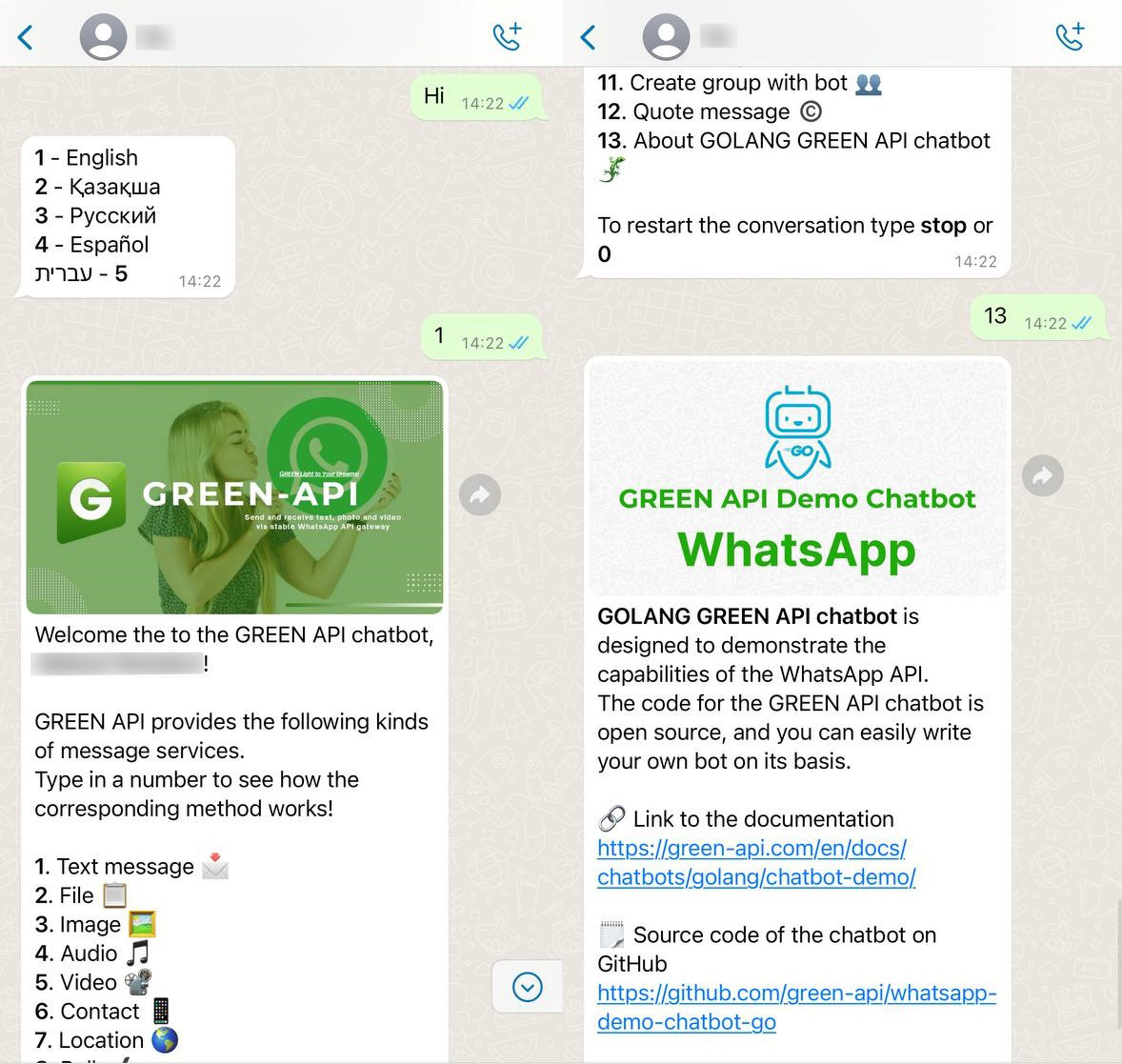
You can read more about the code structure and chatbot setup in the documentation for the GREEN-API Go demo chatbot.
Creating a chatbot for WhatsApp is an exciting and promising process that combines both creative development and real earning potential. Developing such a bot not only provides valuable experience with technologies but also opens up new opportunities for audience engagement, which can lead to a steady income.