
WhatsApp earned its reputation by keeping conversations private. People rely on it to communicate with friends, family and companies every day. But where there’s trust, there are always people trying to abuse it like scammers, spammers and fake “brands” looking for quick wins.
In this article, we aim to inform company owners on how to secure their WhatsApp Business accounts from being blocked. If your clients encounter a sudden warning, we will provide recommendations on how to retain their trust.
Contents
What happened
Recently, some users have seen a message in certain business chats: “Do you trust this business?” If this warning shows up in your company’s conversation, it isn’t random and it definitely isn’t harmless. When someone opens a chat with a business account, WhatsApp may pause the conversation and ask the user to choose either to continue or leave.
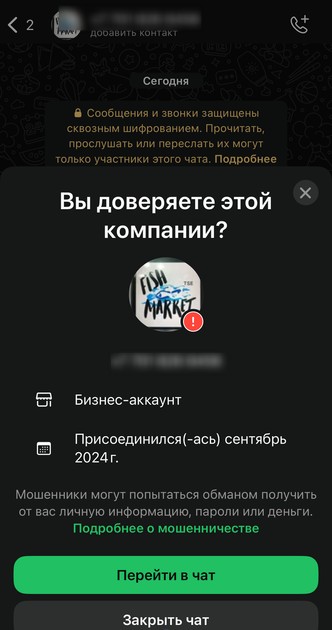
It looks like a basic safety reminder to a regular user. To a business, it’s a quiet signal that the platform has started to question the behavior of the account. It doesn’t mean an instant ban, but it does mean the number is no longer flying under the radar. WhatsApp doesn’t publish the details of how it scores accounts, but real-world behavior shows clear patterns.
Why does this message start appearing
WhatsApp hasn’t clearly released a statement about the new notification system. Based on our interaction with dozens of business accounts and the platform surveillance, we would like to mention several factors that trigger these notifications.
Reports and blocks build up
The fastest way to lose credibility is user backlash. When people hit “Report” or “Block”, WhatsApp takes notice. Enough complaints in a short period and your number’s reputation drops automatically. This almost always happens when people feel like they’re being contacted without consent or bombarded with unwanted messages.
Messaging that looks automated
WhatsApp doesn’t just read messages. It watches how they’re sent. Accounts that fire off identical texts, stick to rigid scripts or show heavy activity right after registration stand out fast. A lack of real back-and-forth makes the behavior look mechanical, not human.
New numbers acting like old ones
Brand-new accounts that suddenly behave like established companies raise red flags. Mass broadcasts, aggressive sales funnels and large-scale outreach from a new number don’t look natural to the platform’s protection systems. It is clear that real businesses grow into their communication patterns while risky ones try to fake it from day one.
What now
Keep the following agenda and avoid the items described below to secure your account from being treated by WhatsApp as suspicious:
Keep conversations natural and avoid copying previous chats
Endless copy-paste dialogues are easy to spot. If every customer receives the same phrases in the same order, it looks like a bot farm. Slight variation and real-time responses go a long way.
Avoid sudden spikes in activity
Sharp bursts of mass messaging attract attention. Big waves of promotional texts don’t look like customer service; they look like spam. Steady, measured activity looks far more trustworthy.
Don’t turn your chat into a broadcast
If you’re always talking and users rarely reply or their replies go unanswered, that imbalance is a bad signal. Healthy accounts look like conversations, not broadcasts.
Let your account “age” naturally
Trust takes time. Accounts that appear overnight and immediately start pushing offers at scale don’t look real. Accounts with real chat history and natural growth do. WhatsApp isn’t trying to punish businesses. It’s trying to protect users. If your behavior looks real, stable and human, you’re usually safe.
Conclusion
Clearly, WhatsApp continues to enhance its platform algorithms, refining its response to suspicious activity by malicious actors. We strongly recommend you follow our advice to avoid losing access to the messenger and your account, which are the most effective ways to communicate with customers. Losing your account will inevitably impact your business’s reputation and customer loyalty because it’s always better to prevent a problem than to fix it.
Check out our blog, where we talk about new features and useful functions of WhatsApp!
GREEN-API is your guide to the world of business and technology!